
In this installment of the Webinar on Web Guiding Fundamentals, we delve deeper into the pivotal role of controllers in web guiding systems. The episode covers the function of controllers, components such as gain, operating voltage, and sensor inputs, and explores the control structure for web guide systems, including fixed gain proportional control and adaptive control technologies. By examining open loop and closed loop responses, we highlight the importance of optimal tuning for improved performance.
Transcript
Show full transcript (917 words)
[Music] The controller is the central processor that takes the sensor input, computes the corrective action and sends that information to the actuator. Nowadays, the controllers also include human machine interface like an operator interface. Previously, the controller could be standalone. It didn't really have an interface.
So the controller could be analog in the sense of electrical analog or pneumatic analog controllers. So basically controller is taking the sensor signal and then making the necessary computation so that the actuator can be positioned at the desired location. In terms of terminology, gain is one of the most common things that you're going to hear in controllers. That's basically saying how quickly or what kind of a dynamic response you need.
gain is going to do that. Other things that you're going to see is operating voltage, power consumption, whether you have a operator interface or not. And then whether this is a controller for a servo motor or stepper motor, they have drives or drivers for it. How many sensor inputs you have?
Does it have Ethernet connectivity? Does it have remote control and stuff like that? In terms of the control structure, most control systems have webguide control systems have this kind of a structure where you have a fixed game proportional control. You really don't need more than a proportional control for a web guide because there's integrator built into it.
But usually you have something like you have a motor, it might have a current loop, it might also have a velocity loop with a tachometer. Then you have a guide structure which has its own transmission ratio. And there's the web dynamic which is unknown. Web dynamics means that if you move the guide 1 mm, how much is the web going to move?
That really depends upon transport conditions, the stiffness of the web, tension and all those kind of things. And then finally, you have a sensor that measures the edge position and then it sends that to a position controller. So this is a pretty simple architecture for most webguide controllers. They are fixed gain and most often they are d-tuned because of the stability and all the other reasons.
Most web guides their controller is kind of d-tuned for the conditions. If you want to get the best out of it, you would need to retune them. The tuning has to be based on the optimal performance because the web dynamics is unknown. Most often DC motors or DC servo motors or stepper motors are used in this kind of control structure.
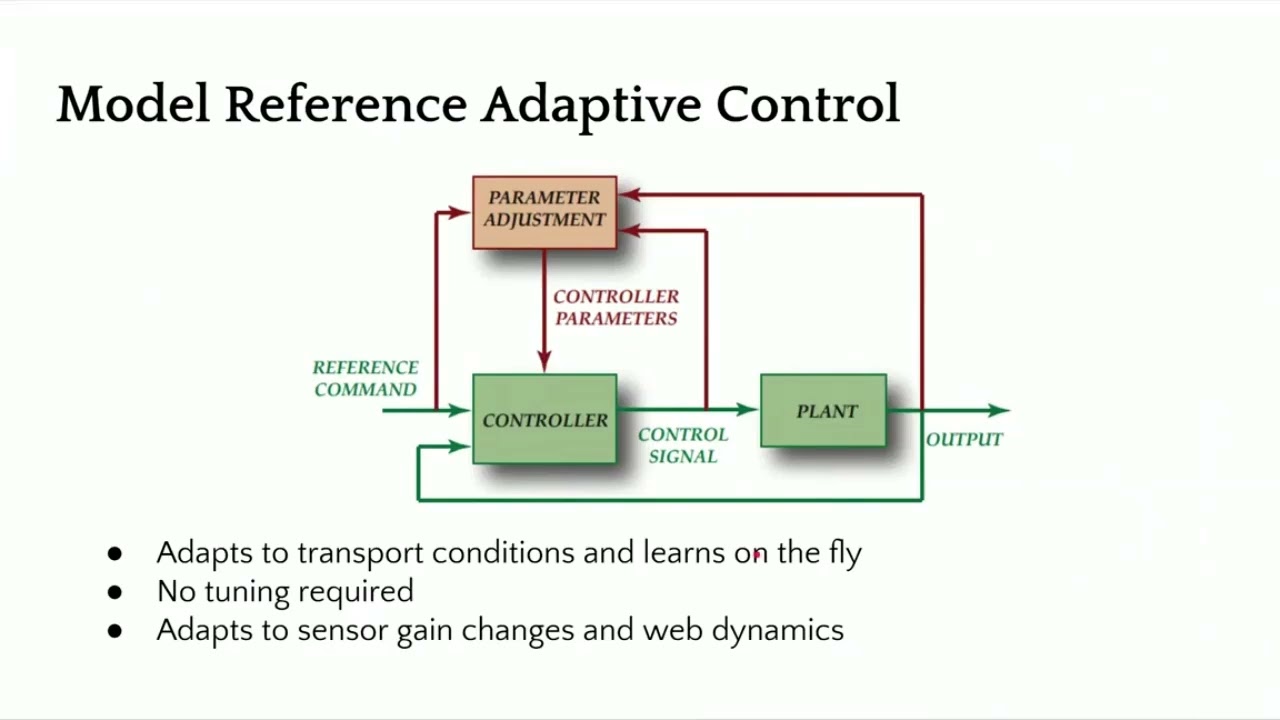
There are some other advanced control technologies like adaptive control where the controller can adapt or learn on the fly and tuning may not be required. When we say learning on the fly, it means that it adapts to sensor gain changes or the dynamics of the web. In our case, we have a similar structure as the one I showed first. It's still a fixed game controller, but with some motion control aspects built into it in terms of curving the position and having trajectories for velocity, we can increase the stability of the controller and provide a pretty aggressive output performance.
You can have a current loop, a position loop, if you have a encoder, and then a position of the actuator here. And finally, the web position, which includes the web dynamic. Just to give you an idea, we have a lot of different things that we can do with the controller. But the dynamics is basically if you move the this is showing a step response, openloop step response for a web.
This was like a non-woven web that we had at different speeds and see how it behaves. And you can see that when you have a step, even though it's open loop, it's trying to get there. The openloop dynamics is different based on how fast you're running. So faster you're running, it gets to that desired location uh as fast as possible.
But the slower you're running, it takes longer. Again, this is an openloop response. This is the final part of the whole web guiding, which is the dynamics of the web. Now if we add a controller to it then we can have a much better response and actually push the web guide.
In this case at the two different speeds that we were running at this was the reference change and this was the actual response of the web guide at the sensor. And then when we have another sensor installed once span downstream you can see how long it takes for that to go through. When we have a step response, we were able to get up to about 170 mm/s or like 7 in per second. This is about close to 70% improvement over an openloop response.
And again, this is closed loop. That means you're actually actively guiding the web. So with a proper control structure design, you can get a high bandwidth system close to 6 hertz or something like that and then even get a well damped system. So you can actually have an aggressive correction if you need to.
In terms of the characteristics of a good webg guiding system, it should have the ability to attenuate disturbances, easy to tune. Obviously, it needs to be stable, has good processing power so that it can process multiple sensors, have industrial Ethernet connectivity. These are for advanced functionalities. And then smart intelligence for industry 4.0.
[Music]

Do you need to find the IP Address of the SCU5 controller? See our video to learn how the IP address can be found.
Transcript
Show full transcript (541 words)
Hi this is Pedro Velasco from Roll-2-Roll Technologies. Today we want to show you how to find the IP address for ARIS sensors or web guide controls are equipped with the Ethernet IP connectivity option. As an example today we're going to use the WPS 440 IR which is a most recent additions to the ARIS WPS sensor lines and this one has an inner router to access the network so that we can monitor this later on. So first we're going to connect an ethernet cable to the M12 connector which is on the side port of the ARIS the WPS 440 IR and then the other side of the connector we're going to connect it to the router in the rj45 Ethernet connector jack Once it is connected, then we go ahead and connect the power to the sensor and then we verify that the connection is correct by looking at the blinking light on the router.
Now after this has been achieved then we can go ahead and proceed to a computer to actually go and find out the IP address for this particular sensor. So by default the router will assign an IP address to the device and this will be a dynamic IP address. Now to find the address you will need to access the Internet through any computer from which you will monitor the device in this case we searched online for Anybus.com and then we look at the support so we hit the support tab. Then we go to the selected product icon and from the select your product Icon you go to the Anybus IC icon and you click on it.
Then you go to the Ethernet IP and here you have a list of software so you're going to download on the software section when the one that says IP configuration utility for module TCP IP configuration. Now you go through the whole process of downloading the this software but once you download then you hit your Start button on your screen and just go to the HMS as you see here and open that up and then you see the IP configuration. When you click on it, it will automatically open this this window right here. Of course, sometimes when you're doing the first time this will not show up so you hit scan and it will scan for anything, any IP addresses are available.
So in this case here you have access to your IP address. Ok, so let's say for example you want, this is a dynamic address, but you want to establish a static address so all you have to do is just right click on the on the line and then you see the configuration tab. Just hit configuration and then you can actually set your static IP address on this window right here. So we mentioned before how to find an IP address for one of our sensors or web guide controls.
It's a very simple procedure as we showed and we hope that this can be of help to you when you are using our products on your operations so again thank you very much and just keep on looking for other videos. Thank you

Check out our newest feature in web guide controls for our web guides, which allows you to change the guide point without touching the sensor!
Transcript
Show full transcript (241 words)
Today we want to show a feature in our web guides that allows for guide point adjustment We can do a fine guide point adjustment or a gross guide point adjustment without having to physically move the sensor The adjustment can be made on the operator interface by just sliding our finger across the screen In a previous video we talked about the fine guide point adjustment and today we want to go over the gross point adjustment For that we have to go to the operator interface screen, and there is a black bar on the screen and all you have to do is slide your finger across the black bar and it will move the guide point After that you will need to hit accept and the guide point will be set Unless you hit the accept button after moving the guide point, the system will not register the change in guide point If by mistake you touch the screen and move the guide point, the guide point will return to its original setting unless you hit the accept icon This is just another of our features on our web guides available in the control unit version 2.4 which is standard in all our web guides since June 2017 Fine and gross guide point adjustment, something we believe will be very beneficial for any converting operation Visit our website at www.r2r-tech.com for more information on all these features

Roll-2-Roll Technologies brings you the latest in web guiding technologies. We are now offering you SCU5 controller, so you can use our sensors in any kind of environments.
Transcript
Show full transcript (386 words)
This is Pedro Velasco from Roll-2-Roll Technologies and today we're a test bench where we you know do some variants of our products. I want to talk to you today about one of our products that we have on the sensor control unit side. Now one of our options for smart sensor control in our line of products is the ARIS SCU for control cabinet mounting on a thin rail as we have shown here. Now we have arranged the sensor control along with a couple sensors so we have two units with two sensors that actually for burning.
This was originally designed for OEMs who wanted to as an in capita control unit and they wanted to use our sensor technology with their own actuator systems and their web guiding systems. Therefore they were benefiting from our technology from our smart technology that's offered in our whole line of products now. The ARIS SCU provides it can provide an analog output, a connection for Ethernet IP applications, an operator interface so to connect the display to it and then on the bottom side, you can see we'll have the two sensor controls, two sets of connections now. The sensors then, the sensors we provide with this, would be with a shielded cable and they can be installed far away.
This is particularly useful for those applications where the sensor needs to be in an environment in which the control unit cannot be in. For say for example, an environment like a vacuum environment now the ARIS SCU can also be used in other applications. You know like for the detection of web positions, monitoring measurement of web width, any industrial operation so it's not only for those OEMs it can also be used for those who have a very special applications like I mentioned before. Applications where the environment wants or requires that the sensor control unit be away from the sensor.
Now this is a lightweight, easy to install, smart sensor control unit that is a coupled with our sensor technology and it allows you to detect and monitor any material position without the need for calibration. For more information subscribe to our YouTube channel and check out other videos that we have with additional tips and tutorials on our products. Thank you.

At Roll-2-Roll Technologies we want to offer you the best products possible. We do extensive research and testing to optimize our web guiding technology. Check out this video to see how we collect data on our web guides.
Transcript
Show full transcript (351 words)
Hi, this is Pedro Velasco with Roll-2-Roll Technologies. Our products are based on our own research. Every so often we'll go back and do some more testing and we do some further investigations of our products work. In this case, I want to show you this is one of test benches.
We build this on our own. Right now, we're actually doing some some data collection on our newest web guide, which is the compact low profile Displacement guide and what we're trying to do right now is we're putting in a disturbance upstream sinusoidal disturbance and then we're recording comparing what the material coming in, how it's coming in and compare with the material coming out, the result of correction through our web guide. We take all that data and then we do some comparisons and make some corrections and further improve the way our systems work. So right now, we're showing you the downstream side of a web guide and what we're doing is the sensor on this sensor here is actually reporting the information from the data at the position of the web guide and of course our web guide is being controlled or guided thanks to that sensor that we have over there, which is a sensor that's provided with the web guide.
As you can see from this view we can see the sinusoidal disturbance being caused by one of our web guides on the front through programs that have to do that for us and then downstream closer to the camera, you can see the our featured web guide doing the correction. Now one of the features our controls is they learn on their own. And that's part of our algorithm So we take the information from this and we further correct it. also allows us to create other features for our customers such as the KOIOS data analytics which can actually help predict other problems upstream from where the web just based on information that are systems provide.
You can see more of the information our web guides at www.r2r-tech.com