

In this episode of our webinar series on web guiding fundamentals, we dive into the critical role of sensors in web guiding systems. Learn about various sensor terminologies such as range, resolution, accuracy, and linearity, and understand the importance of accurate measurement for effective control. We discuss different sensor technologies including infrared, optical, and ultrasonic, and explore the challenges they face including issues with temperature drift and material properties.
Transcript
Show full transcript (725 words)
[Music] One of the most important parts of a webg guiding system is the sensor. It is important because what you can't measure, you can't control. If you have a poor sensor and you're not able to measure the position properly, then there's no way that we can get the accuracy that we need. In terms of sensor terminologies, range, resolution, accuracy, linearity, those are some things that you would see.
type of sensors, infrared, optical, ultrasonic, air type of things that you're trying to look for in terms of web position. Are you trying to look at edge of a web? Are you trying to look for a line on the web or a contrasting feature on the web? How fast can the sensor measure?
Older ultrasonic sensors have issues with past line changes. You can't have the web too close to the ultrasonic emitter because it might reflect the sound waves in a way that doesn't provide an accurate measurement. And then temperature drift. Again, ultrasonic sensors can have issues with temperature drift when we have the P2 electric crystal frequency changes.
And then what kind of a signal output that you get from the sensor. Range of a sensor is the maximum lateral displacement the sensor can measure. Most often for web guiding applications, range is not that important just because of the fact that you're controlling. You're going to bring it in.
But it does becomes critical when you have web width changes and things like that. Most often range is like how much change in the lateral position that you can measure with the sensor. Resolution is the minimum lateral position change that the sensor can see. So if you want to guide a web to 5,000 of inch, then you better have a a sensor that can have 4x or 2x higher resolution than the guiding accuracy.
Accuracy is an indication of how close the sensor measurement is to the real measurement. This becomes important for certain types of sensors affected by materials. Material properties like opacity, porocity and things like that. This is an important characteristic of a sensor.
Linearity is like what how consistent is your measurement with respect to the actual position across the entire range of the sensor. In terms of sensing, why is it important? Some sensors have issues with material properties like opacity, porocity or reflectivity or they may be affected by environmental issues such as air flow, temperature changes or vacuum. So if we can't measure, we can't control.
That's why sensing is an important part of guiding performance. Most often you would see these type of sensors we refer to as opposing beam or fork style or horseshoe style. There are lots of different names for it. Basically how this works is you have one arm emitting a certain type of signal and the other arm receiving that signal and then the web that goes in between blocks it.
It's a simple technology work sensing principle and it works well for a lot of different cases. The problem happens whenever depending upon this type of sensor signal that you have if the web allows that signal to leak through when it's blocked by the web that's where the pro problem occurs. We talked about linearity resolution range all of those things are affected by this kind of sensor. This sensing signal can be air, optical like visible light, infrared lights, or even UV light.
It could also be sound like ultrasonic. It really doesn't matter. And then whether this material is opaque or porous to that signal is what matters in terms of how well you can guide. Often manufacturers recommend different sensors for different materials and conditions.
So you will have a plethora of sensing technologies out there. Like I said, the main disadvantage is material dependent gain change occurs and then requires calibration if you want to get a really good guiding performance. There are other sensor technologies out there like ours which are not affected by material properties and some of the environmental conditions. I'm not going to go into detail about our sensor technology here but just give you a quick overview.
is basically a high accuracy direct measurement or absolute measurement. Our resolution does not depend upon the range and it can work with any material. [Music]
Optimizing Sensor Placement and Roller Position in Displacement Guides
Transcript
Show full transcript (284 words)
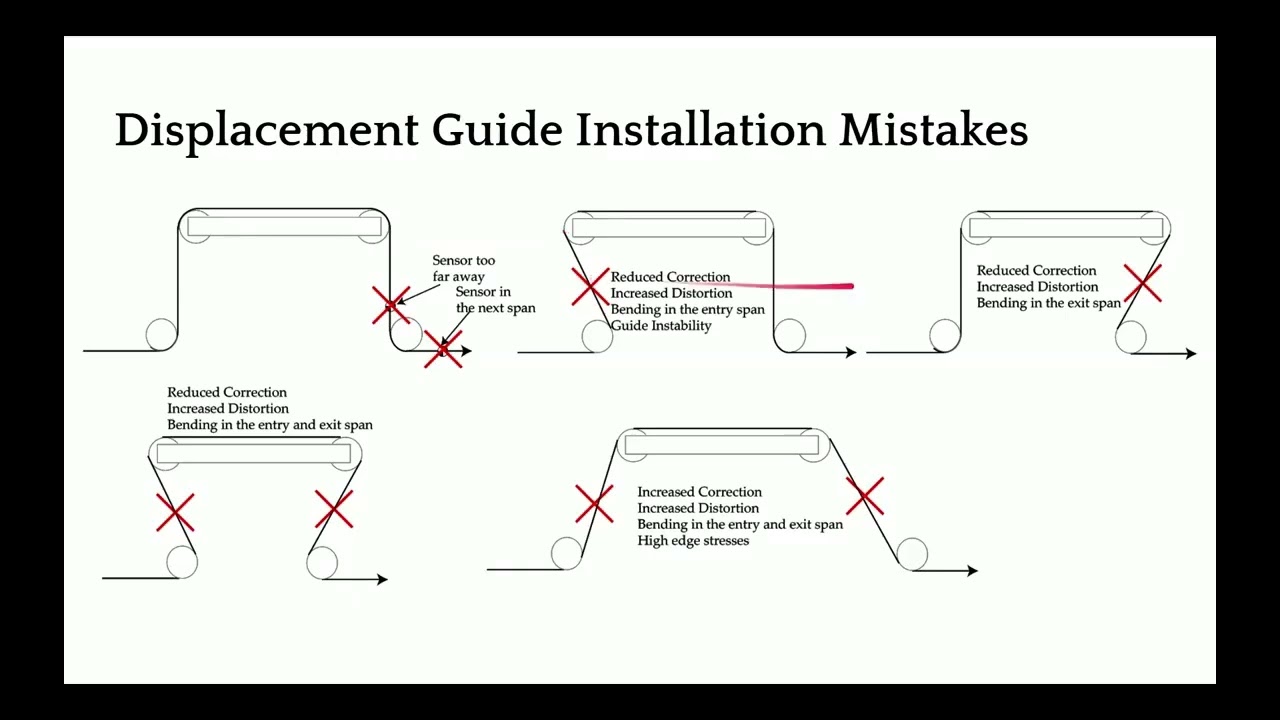
[Music] We don't want to install the sensor too far away or in the next span. This is mainly for control system purposes and stability. When the web guide makes a corrective action, that action is not seen at the sensor immediately. So, if you're running really fast, you might get away with moving these sensors a little further down.
But if you're running slow, whenever this web guide moves here, you would see that motion, if the sensor is as close to the exit roller as possible. If you install it here or here, especially when the web stops and there is a small error, the web guide would keep moving and that might cause the web to break or have unintended consequences. So, we don't want to have the sensor further away or in next span. And we don't even we don't also want to have a scenario where you have an angle that is not 90°.
If you have a 90° wrap, you have twist. As soon as you introduce something which is deviating more from the 90°, you start creating bending in the web. So these kind of bending is going to act as under steering the web. It's going to cause bending that's going to under steer the web and it also causes distortions and guiding stability.
So we don't really want to have any of these conditions. On the contrary, if you have a span exit span that is spread out like this, this is going to over steer the web. It's the bending effect that is causing that and we really don't want to do that. So ideal scenario would be to have a 90°ree wrap in and out.
[Music]
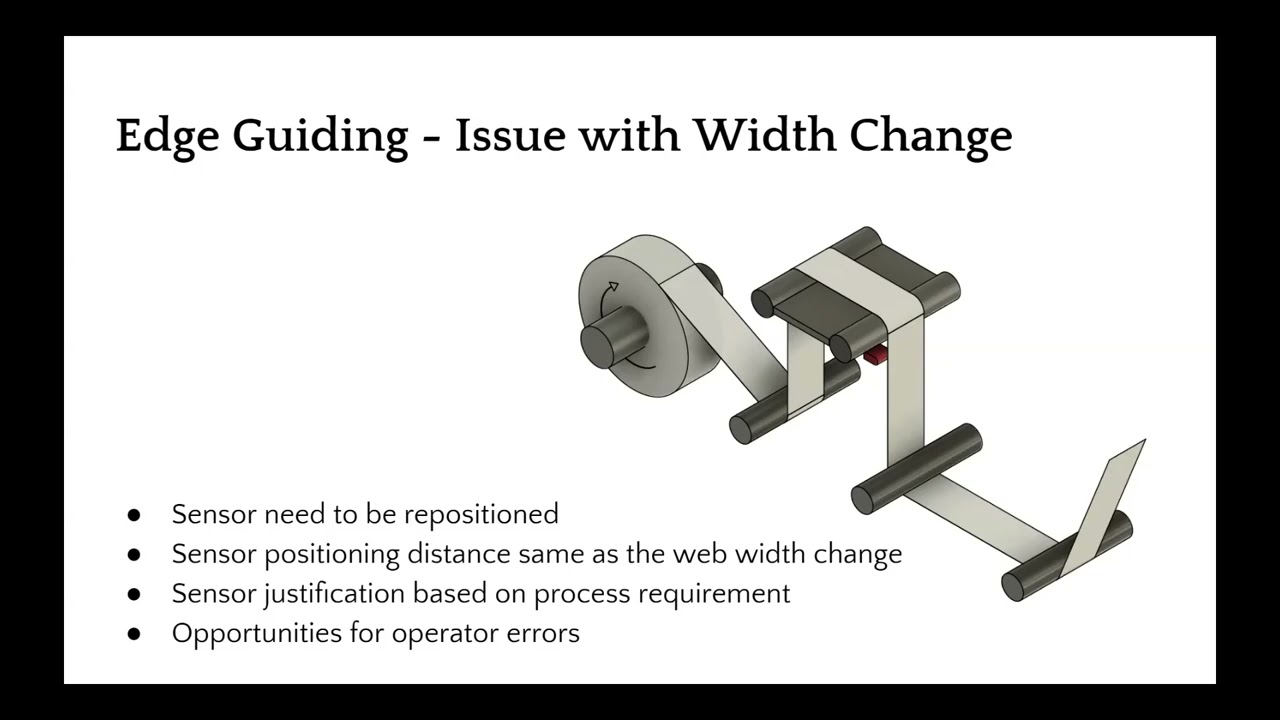
This episode is part of the ‘Web Guiding Applications and Advanced Web Guiding Concepts’ series and focuses on advanced edge guiding techniques, specifically single edge web guiding. The video explains the use of web guides and edge sensors for feedback in guiding mechanisms. It covers the positioning of sensors, the importance of alignment, and the common practice of repositioning sensors during web width changes. The episode also addresses potential operator errors and their impact on web guiding performance during product changeovers.
Transcript
Show full transcript (280 words)
So in terms of edge guiding, most of you are familiar with this. We have a web guide and an edge sensor to provide feedback for the web guide mechanism. Last month we talked about the guiding principles and fundamentals of it. But essentially in most machines in edgeguiding kind of an application you position the sensor either on the operator side or on the drive side drive or the gear side and then the web is guided to the middle of the sensor position and the sensor is positioned along the cross machine direction so that the alignment provides the required justification of the web.
The main thing with this kind of a system is that it works well for most cases and for maybe majority of the applications there's no issue with it. The main issue comes when we have to change the web width. Whenever there is a product change over and you do a web width change the sensor has to be repositioned. As we get narrower, the sensor has to be moved to a different location.
That location of the sensor has to be justified based on the process requirement. In these examples, the sensors were moved so that the web center line position is always the same irrespective of the web width. But in certain other applications, it may be necessary to justify along the operator side or maybe along the drive side. So that is the only thing someone has to do in terms of product change over is to move the sensor.
But moving the sensor creates opportunities for operator errors and this can have other consequences with the web guiding performance.
Web Guiding Applications
- Edge Guiding
- Straight edge
- Fuzzy edge
- Jagged edge
- Wrinkles
- Center Guiding
- One sensor measuring two edges
- Two sensors, one each for an edge
- Moving sensor center guiding (mechanical sensor repositioning)
- Electronic guide point adjustment
- Line guiding
- Contrast/pattern guiding
- Line/contrast/pattern guiding on unwinds and rewinds
- Mechanical chasing application
- El
Transcript
Show full transcript (9143 words)
and I'll be your presenter today I just want to make sure that I take care of some housekeeping stuff all of you are currently muted and you won't have access to the microphone but you can use the chat window on your left hand side of the screen to send messages to us I'm also here joined by Pedro and Carlo both from both tall technologies and they will be monitoring the chat channels basically the Q&A and you can type in your questions or comments there we will also be having some polls during this presentation just to get an idea about who you are and what kind of function that that you do at your institution so I do have one right now which is asking about what market do you belong to or what industry that you belong to so if you have a chance feel free to answer those poll questions these will be really helpful for us as we go along and I'm gonna wait a little bit more time to give some more people some time to join but we should be starting in about couple of minutes okay let's go ahead and get started so well once again thank you for attending this webinar this is gonna mainly focus on web guiding applications and a few advanced web guiding concepts basically we're going to deal with edge guiding and line guiding we're not going to cover any control concepts in this presentation but more in terms of structurally how do you do edge guiding for different kinds of application so the key concepts that we will be covering in this edge guiding aspect of it is single edge guiding that is guide the web based on just one edge and then what is center guiding and we'll also cover some topics about sensor positioners there are different types of sensor positioners what is a moving sensor centric guiding system some of the later concepts are the current technology is related to what is called as a guide point so we will talk okay so there are some feedback saying that they're not able to hear one second okay so hopefully you guys are able to hear me Joe if you can hear me just say yes okay so the current technology with respect to guiding involves a concept called as guide point we'll talk a little bit about guide point and then we'll also talk a little bit about remote guide point adjustments this is we needed for coordination between different web guides and then we also talked about couple of different concepts called as Deadman and edge filtering so that's kind of a quick overview of what you're going to look at in edge guiding we're also going to look at other things related to line guiding as well as what are some of the issues with both of these techniques okay okay so in terms of edge guiding most of you are familiar with this we have a web guide and an edge sensor is there to provide the feedback for the web guide mechanism last month we talked about the guiding principles and fundamentals of it but essentially in most machines in edge guiding kind of an application you position the sensor either on the operator side or on the drive side drive or the gear side and then the web is guided to the middle of the sense of position and then the sensor is positioned in a location along the cross machine direction so that the alignment provides the required justification of the web so the main thing with this kind of a system is that it works well for most cases and for maybe majority of the applications there's no issue with it the main issue comes in when we have to change the web width whenever there is a product changeover and you do a web with change then the sensor has to be the pre position so as we get narrower and narrower the sensor has to be moved it has to be located in a different location there and that location of the sensor has to be justified based on the process requirement so in these examples the sensors were moved so that the web centerline position is always the same in respect of the web width but in certain other applications it may not be necessary and it may be necessary to justify along the operator side or maybe along the drive side so that is the only thing that someone has to do in terms of whenever they do a product changeover is to move the sensor but moving the sensor creates opportunities for operator errors and this can have other consequences with the web hiding performance now in order to another way of doing the guiding is to have two sensors one on either side of the web this is called as Center guiding and the center guiding is one of the commonly used techniques whenever we need to justify the web to the middle of the design or the middle of the process here in this case the sensor the control system takes the values from the two sensors and the average of those two values will provide the centerline position and then the web will be aligned to the middle of the two sensors that's what happens in and rotating again when we have central kiting we still have the same problem with web with changes and this requires the sensor to be positioned on either edge and here it's a little bit more complicated in the sense that when you move both the sensors both these sensors have to be moved equidistant from the center line position of the machine so again creates opportunities for operator error during changeover and things like that in order to avoid the issues with manual positioning and also to automate the process some kind of mechanism are used to position the sensor these are called as sensor positioners as you can see here this is basically an actuator that drives some kind of a lead screw or a belt or anything like that and then the two sensors are mounted on that linear rail or lead screw mechanism and when the web wit needs to be changed this actuator is driven so that either it retracts or it it goes towards the web or it goes away from the web inside the web or outside the web to move the sensor to the right location now this control can actually be done continuously it doesn't have to happen only when a machine is stopped or when a product changer workers the way it is done if it's done continuously is to actually have another control loop where the two sensors are actually chasing the web one control loop is used to guide the web where it's actually guiding and then the other control loop is used to chase the web so that it can adapt for the web with changes so this is usually referred to as moving sensor Center guide the actuator can be electromechanical or it could also be hydraulic but most commonly it's electromechanical actuators or those that are used right now so as an automatic sensor positioner is used to move the sensors so that the web weight changes are being accommodated by this system now the main issue with sensor positioners or moving sensor center guide is mechanical wear and tear as you can imagine the actuator needs to continuously move back and forth and then that creates a lot of issues it is also complicated just because of the fact that you have two control loops and there are two control gates that someone needs to worry about one is for the guide mechanism and then the other is for the chasing mechanism and then obviously this requires an additional drive or an additional output in actuator for the system and then all of these just makes it complicated there are also issues with it in terms of stability issues if the chasing is too fast and things like that then that are plagued plaguing this kind of our system again when the web word changes the sensors are moved back and forth and this can happen automatically continuously or it can happen during changeovers where the operator press the button to chase the web and then stop the chasing mechanism and continue guiding the web an alternative solution which is getting more popular lately is actually to use two sensors two white sensors that can actually span the entire web with width change when we do something like this where in respect to of the web width you don't have to move the sensor then this kind of a mechanism completely eliminates mechanical moving parts reduces wear and tear on the system and then it will be simple to use there there will be no need for the sensor to be moved and it's easy to maintain and there's only one actuator the only the only one actuator is the actuator or the web guide and hence there's only one loop again the two sensors will provide their own measurements and then the control system will use the average of those two measurements and if the sensors are wide enough so that it can capture the entire width change that is experienced in the process then this would be a really simple system to use it doesn't have to be a single two sensors if the sensor is wide enough it can actually cover the entire viewing entire web surface so that it can look at both the edges of the web again like I said this is one of the most robust and simple kind of a installation where it it reduces operator errors and things like that now one of the things that when we have a wide sensor that comes it comes to us is what is called as a guide point so here we have the sensor window and this might have a sensor range from maybe two inches to maybe thirty seven inches it could be any within that range and the the old sensors we're like mainly like points or sensors and they were just looking for the edge position and it was just looking at just a small variation and as long as you're doing a guiding the sensor range really doesn't matter so we were able to get away with the smaller sensor range but with the advances in sensing technology and things like that now we have the opportunity to look at a wider so with a wider sensor window now we have the opportunity to and not only guide the web to the middle of the window but to any arbitrary position within the window the reference position or where the web guide is controlling the web location that's called the guide point and then the error if the web position falls to the left here it'll be a positive error that the web position foster right here will be a negative error and we can actually electronically move the guide point in such a way that if the web width changes we can actually move the guide point instead of moving the sensor now this is an example where the web with reduced so we moved the guide point and this allows us to instead of manually positioning the sensor we can electronically position the location of the web so by moving the guide point you can actually use a single sensor and you can still do central guiding as long as you know how wide your web is and it's just a matter of mathematics to get it get it there electronic guide point enables us to do quick changeover it doesn't require an operator to move the sensor manually or to the sensor positioner manual movement of the sensor or being avoided right now just because of the safety reasons and things like that we don't want an operator to get into the Machine and move the sensor so there are some lead screws or motorized stages that would move the sensor and then if we know the width of the product based on a product code or something like that then we can pre-program this guide point changes whenever a change of workers and this may said extremely simple and quick to do a changeover now the guide point or the concept of guide point it not only is for a single sensor but it's also for two sensors it's just a matter of us going into the mathematics of it it's just simple algebra that we need to go through but essentially we can even have a guide point for center guiding applications and that guide point would be a function of the relative position of the two sensors and then basically how they are installed with respect to the center of the machine and then the movement of that guide point would be seen at each of these sensors by half the change in the guide point so and with me have two sensors we can we can come up with all different scenarios and and we can also offset the web guide from the central line position based on making some changes to these guide points and like I mentioned if you don't know the width of the material that you're running or the product could have variations in width then if you put two sensors that are equidistant from the middle of the machine irrespective of the web weight change the guide point and may not be changed so there's really no need to change that so for example here when we change the web width from a wider web to a narrower web the width is going to go down equally on either side of the web and since the web guide is already controlling it it's going to make sure that it sees the same amount of wear on either sensor and that helps us to do changeover without even changing the date point and when we use two sensors so mainly center guiding offers us several advantages first and foremost is that it averages the edge position because we are looking at both the left edge and the right edge and that helps us averaging that and when you look at other challenging applications later on you will see that how that's helpful and then you don't need to do any guide point adjustment and then even with a manual or automatic sensor pushing is not necessary it's really simple to install maintain and operate and technically if you have two sensors on either side of the web it is an inherent WebKit X sensor so you don't really need another sensor to say there's a Webber's present or not and then you can also do width monitoring at the same time web guiding and wit monitoring can be done at the same time with this kind of system another concept that is is that I wanted to introduce is what is called as a dead band so now the guide point is the reference position where the actuator will change direction to guide the web you can introduce what we call it as a dead bag and what that what that does is that whenever the web fall falls within this dead band the actuator will not actuate as you can see this Web edge here is kind of like fuzzy and serrated and and it's not that great while here it's like a straight slit edge you don't really want the web guide to be moving back and forth for every small change in the web edge position and in order to avoid that you can is what is called as a deadpan and essentially what it does is it's a region where the error is going to be zero and then this non-linearity here and then the error becomes negative or positive based on the direction so the dead band is usually around the guide point and and it's usually maybe half a thousands or ten thousands five five thousands or ten thousands and you can also adjust the deadband electronically based on your application when you don't have a really nice edge then and you don't really want the web guide to follow those edges all the time you just want a grass positioning of the web you can also filter the edge position typically we use like an exponential moving average kind of a thing so for example here this is data from one sensor as you can see it's kind of like a sinusoidal position here and then this blue line here is the data from the other sensor and the standard deviation is about seven for each of these sensor outputs like I mentioned Center guiding is gonna average out that without any filtering just by Center guiding you are reducing that standard deviation just by taking the average of those two signals but if you go in and actually filter that like using an exponential moving average then you can reduce the standard deviation here so we use what we call it as an exponential moving average edge filter to make sure that we don't react too much to these edge variations and essentially it's like an infinite impulse response filter and and the coefficients of these can be adjusted based on the speed or if you know how much variation you're going to see with the web edge that you can adjust that the faster you go the web itself is filtering those variations for you but it's mostly effective for sinusoidal or randomly kanna distributed edge positions now in terms of some of the challenging applications or aspects of edge guide II will talk about these few items here one by one so first one is like like a fuzzy edge so you have an edge like this which is extremely serrated maybe it's coming out from some kind of an extrusion process or things like that and you really don't care about getting it within five thousands or something like that but more about I want to get it in place because I'm going to do an edge trim here so if you have edge guide control system just regular plain Jane one then you're gonna have issues with oscillation so every time this edge position changes your web guide is going to oscillate back and forth back and forth and then your accuracy of the guiding system is not going to be any better than the edge variation that you see here so one of the things that you can do to handle web like this is to obviously do a central guiding and that will average out the two positions then use a dead man I'm filtering based on your conditions here now there might be some occasions where you have an edge that is deliberately like this it's got like a square wave or a sawtooth wave or some kind of a profile that is deliberate for the product now what happens here in this case is that if you have a conventional sensor that is looking at this edge that profile is going to be like a square wave and and the other thing is that depending upon the the duty cycle of the square wave and depending upon the speed and the sampling rate of the sensor you might be sampling on the high side all the time or you might be sampling on the low side all the time or any combination of those and whenever the speed changes it's going to cause the the web guide to shift or drift based on the speed changes which is a function of the profile of the web that you see here so how do you how do you tackle such a kind of a web now we did temporal filtering that is time based filtering we can also do like space based filtering or spatial filtering and use what what we call as a bang-bang control to do it this is an example where you have this web that is kind of serrated and typically we would install the sensor along the cross machine direction of the web but in this case we wanted to take advantage of the way the sensor measures the edge position and the offset between the sensor so we were able to do what we call a Slyke averaging along the length of the web spatially and then also have a time-based averaging and then do a bang-bang control that means like it's if it goes here move here it goes there move here and there's a dead band there so that's one way of tackling a complicated edge like that now the other common problem that you're going to see what edge guiding is wrinkles now wrinkles in in by nature it's really hard the the type of the wrinkle it could be like shear wrinkle with different shapes and forms and things like that but essentially what it does is that when when the web buckles the troughs that are created are going to reduce the width of the web so if you're just gonna guide based on one edge you might be oscillating back and forth because the wrinkle is gonna cost the edge to come in and come out come in and come out and things like that and most often you should try to eliminate the wrinkle problem before trying to fix it with guiding but if you have to fix it with guiding then obviously center guiding with edge filtering and deadband is something that you should try to use to reduce that issue again first and foremost we need to try to see if we can eliminate the wrinkle problem and then if you still can do that and you still need to have better guiding then you can add these techniques here and do that now I mean finally in terms of material and you're going to come across some porous webs or blow basis waiting on moments with a typical conventional sensor that works based on blocking and unblocking the porosity changes can actually fool the sensor and that might cause a pseudo edge movement when in reality the weather's not moving at all and this might cause guide oscillation when the sensor controller gains are high or like a really sluggish response if the gain is set to low overall like a porous web where the sensor signal goes through then you're going to have issues with guiding now obviously if you have a better sensor then you can do better and if the sensor is not affected by porosity or opacity then you wouldn't have that issue at all but if you don't have that option then you can certainly do filtering and also do deadband if you have a little bit information about your web and the opacity changes so just to give you an idea this is let's say these web edge position from one of the sensors which is in the blue line here a dotted blue line and then the other one from the other sensor when the signal goes through the sensor and when the porosity or the density changes occurs and that would be perceived as a web position change at the sensor now if you do center guiding obviously you can try to eliminate some of those averaged out some of those and then and the the filtered one is shown here in solid line so if you do like a moving average filter then you can further reduce that and try to eliminate a lot of those oscillations in the website because of that now if you add a dead band on top of the moving average that would actually significantly reduce those edge variations or the perceived edge variations because of the opacity changes and you can do something like that so just to give you an idea like if we look at the standard deviation of each of those sensor values you have a standard deviation close to one if you just do with one edge guiding without any filtering additional thing if you just do Center guiding you can significantly reduce that standard deviation now if you apply a moving average filter you can reduce that even further and then a dead band can reduce that even further again these application of moving average and deadband all of those really depends upon what kind of material you have how much information that that you have about what is the expected variation and things like that so those are material related challenges in guiding there are also challenges in terms of coordinating so let's say you have two different layers of web that need to come here and they need to be laminated and this this lamination process the simplest way is to have two standalone web guides that are guiding the web and then somehow physically have the sensors of those corresponding web guides exactly at the correct position with respect to each other and if we do that then we should be able to laminate these two layers of the web but usually this is well sometimes this could be a challenge because if there's web with variation or some changes and things like that where you would require some kind of a coordination between these two web guides so that when this layer comes in in contact with this layer they are aligned at a certain location exactly coincident or maybe offset a certain distance whatever it may be based on an application and if the sensors needs to be moved for width variations then that's a problem that can cause issues you really need to make sure that if you move the sensor a certain distance this sensor also have to be moved that certain distance so how do we solve that problem the old way of doing it is what is called as a mechanical chasing and in mechanical chasing application you have a master web that is coming here and then there is a sensor here that is chasing the web this is similar to the center guide moving sensor center guide where that second loop was chasing the web for web width variation now just think of that system but take one sensor and put it in on the master web and take the other sensor and put it on the this this follower web and what it's going to do is this sensor has going to have a control loop that is going to move the linear positioner in this case it's going to be in and out of this plane of our monitors here and it's going to move the positioner so that this chasing sensor will match with the master sensor when this is moved and this is connected to the guide sensor this guide sensor is also moving in tandem with the chasing sensor essentially we are changing the guide point of this and this is called as a mechanical casing application so again this is a system where you have a sensor positioner so there's an additional actuator required and it adds complexity depending upon the location where this sensor this Web guide needs to be and where this is it could be quite complicated in terms of accomplishing this and but it's been done it's been done with both electrical electromechanical as well as hydraulic actuators now one of the drawbacks here is that when we want to do the if these sensors needs to be central central sensors that means that we want to justify the lamination based on the average of two sensors then this becomes really complicated really quick what is the modern modern way of doing it is basically to use the the feedback from the master sensor and send that as an electronic guide point adjustment for the guide sensor so in this case the master sensor is recording the web position of the master web and whatever the variation that is seeing here is sent as a feed-forward signal feed-forward signal for the web guide that is following the master web so the web guide aligns the follower web to a guide point that is adjusted by the master censors feedback so electronically it's very simple to do and there's only one control loop here that is the web guide loop and then the only added thing is that it's not a fixed guide point reference now the reference is a feed forward term that come from the feedback from this master sensor and we can also do center guiding with this so you can technically have to master sensors and take the average of those two measurements and take that as the central line position and provide that as a feed forward offset to this edge sensor which can be a single sensor or two sensors so that's what is called as a chasing application now if you want to do more than two webs then it gets complicated mechanically but it has been done in the past and the way it is done is again you have a master web and then there's a chasing sensor and this first part of it is exactly like a chasing application so we have a you have a linear positioner that is closed the loop is closed based on the the chasing sensors feedback that moves the linear positioner in and out of the screen that moves the guide sensor on the top web so that the guide point is adjusted now if you want to follow this position for another layer of web what you have to do is you have to make an synchronize this actuator and this actuator this has been done with hydraulic cylinders as well as electronic actuators but there is a synchronization now you you are looking at there is one control system for this web guide there is one control system for this this chasing moving sensor positioner there's another control system for the slave actuator and then there's another control system for this web day so as you can see it just gets too complicated too quick and the main problem with these kind of things is synchronization this master actuator and the slave actuators may get out of sync with respect to each other in terms of the position now that creates more problems and it can solve a more elegant and a modern way of doing it is again using the master sensor position information and use that as a feed forward to another web guide and in another web guide here we've just shown two web guides technically you can have multiple web guides and you can still do the same thing again it eliminates wear and tear simple expend inexpensive and it's expandable and there's really no limit to how many you can do now what are some of the considerations for electronic coordination first and foremost we want to make sure that the web position variations seeing at the master sensor we can see all of that that means that you need to have a sensor wide enough to be able to see that it really depends upon the application and whether that web guide is whether that web is guided or not now in these examples I showed in these examples I showed like this master web not being guided but there's no reason why we can't ID this web with another web guide and use the the the position of the the web position from this sensor which is which is guiding the web as well and use that for the master sensor can be used what for control and for also for feed-forward signal for all the slave units web backlinks it would be best if the web pad lengths are the same this would provide the best results so that you don't have any delay this is usually not an issue for like steady-state errors but if you have some sinusoidal or non steady-state errors that's when the web path length needs to be ideal and then if you can't do that and if your application is pretty complicated where you need to have you might have sinusoidal variations that you need to match then what you could do is use a dynamics in the feed forward term basically compensating for the path length variations this technique can also be used for some advanced situations where you could use two sensors one sensor further downstream from the web guide and use that average of these two sensors with some additional dynamics to control the position of the web much downstream from the existing website itself you still need one web guide right at the exit of the web one sensor right at the exit of the web guide and then another sensor can be much further downstream and you can use some added dynamics and feed-forward them to do that and then with with these electronic coordination you can also use Deadman and guide point offset so if you don't want the web to align exactly on top of each other we need one web to align at 10mm and the other web to align at negative 10 mm you can do all all those combination of things with electronic coordination so that's kind of some of the quick applications of edge guiding let me just quickly go over some common errors that we see and when we are trying to do edge guiding applications first and foremost the most common one is extreme misalignment so what happens here is that you have a web coming into a web guide with an already which already has an upstream misalignment and this puts the web guide or the actuator at a non-zero steady state condition and that means that this Web guide is already tilted like this here at at a position and this actually limits further correction in this direction the web guide might correct in this direction properly because it has enough stroke but then it may not correct here on this direction where do we see it let's say you have an unwind role if an operator is loading the unwind role they're not loading at the right location where these sensors are justified to either to the center of the machine or to a certain justification with respect to the machine that's the most common thing that we see other places like let's say you have a blonde film line and you have a non centered bubble that's another place that you can see there now what it does is basically correct limits the correction on one side now what is the solution for something like that if you have a sensor that or a controller that can provide a position feedback and you you can take it into a PLC or anything like that then that would help you not really correct for this issue but to use that information to make sure you fix the underlying problem which is either misaligned on windrow or bubble not being in the center and then we can also provide some kind of an alarm signal when the web reaches a certain if it reaches the extreme position or not the other thing is which is very similar here instead of the web is coming at the right location but the sensor is at the wrong location this happens when we do changeover and if if the the operator is not moving the web to the right location that might happen and and as soon as the web guide is put into automatic this is going to move the actuator or web guide to one side because this was the sensor was set for a certain width and the web width has changed and that causes the same kind of follow again is just one of the ways to avoid this is to make sure to use a wider sensor and if you are doing center guiding wider sensor all of these avoids the issue of moving the web and then you can do an electronic guide point adjustment so that you don't have to worry about repositioning the sensor and then same alarms when the web position is reaching the extreme position or an actuator feedback to a PLC or additional monitoring system would also help the other thing that we see is that lets say the correction on the web guide is one inch but then the web that is coming into the web guide has got an oscillation way more than one inch or it could be or it could be something like not just the actuator stroke limit but also the bandwidth but here I just put it as stroke of the actuator but again this is where you need more correction but you don't have it well the only thing that you can do is actually redesign the web guide if you remember from our last last month's presentation the correction from a displacement guide is actually a function of this guide span so if you need larger correction the guide span needs to be larger so sometimes it may not be possible for you to do that because of space limitation and things like that or the the magnitude of disturbance is large enough that you cannot really correct it with one guide so you might have to use multiple web guides there so that would be a possible solution so those are some of the concepts in terms of edge guiding now let me just quickly go over to line guiding and quickly cover some of the few other concepts in line guiding as well so edge guiding is looking at the edge of the web anytime you want to look at a feature on the web you would have to use line guiding or contrast hiding why do we want to do that maybe the the web that you have has got edge variations and you are actually printing on the web this is the most common example is line guiding is used in the printing industry where you have multiple print cylinders and then you want to have multiple the web to be aligned to these printed patterns and it's not typical to see web guide between print units but then once the printing is done you go to the next process like converting like slitting coding laminating anything like that now you don't really want to cut our code at the wrong location so you would justify it based on the printed pattern which is the most important thing right now feature right now so again you follow a line or an edge or a pattern on the web on the surface of the web not the edge of the web this is used anytime when there is feature registration is needed and the pattern doesn't have to be a printed pattern we have done where the web itself has a shape so some kind of an extruded plastic which is cartridges or ribs on the web and the extruded edges are not really straight but the ribs on the extrusion are pretty straight so you want to guide to that you can do that and usually a camera or a visual sensor is used to do that now the advantage is that you can avoid aids variations and this is the only way to do registration based on surface features so if all you care about is making sure that in the subsequent process that process aligns itself to a pattern on the web rather than the edge of the web is the only way to do it it could be expensive depending upon what you want to do and it does require teaching or interactions and most common thing that you see with this as a problem is low contrast features that means that the feature on the web and the background of the web don't have enough contrast variation that you can pick up that feature properly now in terms of line and contrast guiding you can actually do a whole bunch of different things because we're not just looking at the edge of the web you can follow a line and you can say I want to follow the right edge of the line or you can follow a left edge of the line doesn't even have to be a line it can be a negative space that you're following like this white negative space there or you can follow a pattern an edge of the pattern which is kind of straight and then you can also follow a middle of the line so any of those kind of things you can do with line guiding with an appropriate sensor of course so one of the common things that you're going to run across when we do line guiding is intermittent lines so instead of the line being solid you have gaps in the line usually when they print a line it's solid but it's it's an example like this where you have a label and let's say it's a die-cut label and then the little that die-cut has been removed from the matrix so you want to follow that edge like that so again when you have an intermittent light the main problem is that is the sensor can provide you the position information when you are right here but when you're in the gap the sensor doesn't know and one of the things with line guiding is that when you don't see anything there's no way we would know which direction to move because the pattern could be on any side in an edge guiding application if you don't see a web then you know you need to go this direction so that you can see the web and if you see the whole web then you need to go the other direction so that you don't see the whole web in edge guiding we know that but in line guiding there's no way of knowing which direction to go if you don't see a line so this is a problem and the way to address this problem there are a couple of techniques to address this problem one is to get some information about this line itself in terms of how long the line is how fast the web is moving so that you can have some kind of sampling frequency and then you can build you can build building a timer or a timeout timer so that we can say that well if the web is running for this long and I don't see a pattern for this timeout period then do something so you can add something like that this this technique does require knowledge of the pattern and if the pattern changes it needs to be programmed speed and all those kind of things a better way of doing that is to have a loss of contrast signal and lock the web when you don't have that signal so what it means by that is if the sensor sees this line right here it's got a signal when it doesn't see it it has to go into a special condition called as no contrast condition and in that condition the web gate can be locked and then when the line comes back in the it will resume control again now the only drawback with that is if the web moves farther that you are outside the viewing area of the line then that's a problem how do you avoid it well you have a wider sensor if you have a wider sensor let's say you have a four-inch sensor and the web is known to move less than 2 inches then there's no way you will miss this line and in that case the other thing that we see with [Music] with edge guiding is the loss of focus that means that you cannot really install the sensor just like what you would do in an edge guiding sensor the motion of the web guide itself causes plane change and this could cause focus issues and the solution is using a backup folder or a dead bar like what is shown here so if you have a sensor that is looking at the edge of the web a or surface of the web for that matter but when the web guides actuate back and forth this twisting in this pan is going to cause the web to go closer and further away probably sensor and especially when we are trying to look at a feature the amount of light coming back the feature teaching all of those gets affected because of that plane gene so the solution would be to put a dead bar or an idle roller here and then you install the sensor so that it's looking at the web on the dead bar the dead bar is going to stabilize the web itself wrap angle above like five degrees if it's a dead bar and if it's a roller it can be up to fifteen degrees but no more than that and then again we follow all the same procedures in terms of how far the sensor can be from the web guide and things like that so that's a way in which we can stabilize the web and the thing is that this is not only applicable for line guiding it's also applicable for edge guiding let's say you have a pretty big web guide and it's got a lot of correction and that correction causes the plane change a significant plane change you can put a dead bar right there and then put the sensor before or after if you haven't like a small five degree wrap then it doesn't matter if you put it before or after the dead bar and then that will stabilize the web and that will make sure that the web doesn't touch the sensor when this rotates back and forth a couple of quick concepts on other line guiding applications now if you have an unwind roll how do you install the line guide sensor or a contrast sensor in in the other case this would have been freeze fan just because we need to support this the web to avoid the focus issues there has to be a shifting idea that's installed at the exit of the unwind and this idler or a dead bar has to move with the unwind and then the sensor has to be installed so that it can look at the web on the roller and then this sensor has to be fixed to the Machine frame it cannot move with the courage and we do the same thing with rewind the only difference here is that again the sensor has to move with the rewind in this case and then you can have a fixed idler or a dead bar in this in this pan right before it goes into the rewind so those are the quick application summaries of an advanced guiding concepts and just to summarize what we talked about today our recommendation would be if at all possible use center guiding Center guiding provides or averages the two edge position so it inherently filters or providing an averaging effect for edge variations and then especially if you have web width variation you can avoid some of the common mistakes with improper sensor positioning and things like that you can also use the two sensors to measure web width that's an additional signal that you can use for your quality control purposes if you have some complicated materials where you don't have a straight edge and then it's causing problems we should look into deadband in the in the controller and then edge filtering these are a couple of things that can significantly improve the performance of the guiding system obviously the sensors are unaffected by the material changes you're going to avoid a lot of other issues that you would see with mention on sensors coordinated controlled when you want to do multiple web lamination it's better accomplished with electronic guide file guide point changes this prevent any kind of mechanical wear and tear reduces the complexity of the system and can provide a good performance when compared to other mechanical system and as an additional feedback on your web web line itself we would recommend if you can get actuator position feedback that can help and if you are monitoring that information that can help identify and prevent any performance issues that may be causing from an upstream process so best example would be like improperly position unwind or some kind of a steady state shift that is coming from an upstream process or misaligned order or anything like that in terms of line guiding the loss of line signal if you are able to get that then that would be good because some of the sensors that are available might not have a wider sensing range so if you go outside the sensing range and you don't know that you've gone outside the sensing range then at that point the web is not guided it's just free-floating kind of thing so if you have a loss of line signal then you can use that into your PLC and avoid any issues that you might have it's a quick summary of what we talked about again some additional resources that are available on our web site feel free to go to our website and take a look at that and then our contact information so once again we really appreciate your time today to to listen to our presentation and we'll open up to any questions okay there's a question here that says that shouldn't the reboil sensor position be in the moving station that is correct I think that's all we had it here so the sensor is actually moving with the rewind here and it's chasing the web it's not actually guiding the web if you look at the unwind it's the opposite the sensor is actually fixed it's not really clear here but it's not attached to the carriage the sensor is fixed and then that's how it is okay okay is there a reliable web sensor for high temperature 200 degree C for clear films I am not aware of anything our sensors are rated for 85 C and they can work with clear films most often clear films ultrasonic sensors are used but at 200 C the frequency of the crystal would be affected by it so we might have to get back to you on that if we know of any sensor that can be used at 200 C there are some other questions that are specific to our product which we will answer separately you know mind your application where the entire winder is on a shifting base where is the idle idle sensor placement in the machine at the winder Inlet idly or further downstream or close to the actual winding location okay so that's a great question let's see so ideally in this binder or rewind it's it's kind of the same thing here ideally we want to put this as close to the winder as possible that would be the ideal location as if you have a roller that is going to take care of the diameter variations then putting this roller putting this sensor as close as possible here would be the ideal location farther away again we're adding delay to the system there's another thing that is not considered or not talked about enough is that the stiffness of this mechanical arm that is holding this sensor is an important factor if this if the arm is not stiff enough that's going to cause minor instability so as you put it further away at the stiffness or you got to make it really beefier to be able to have a stiff sensor there so ideally as close to the binder as possible is the ideal location okay are there other filtering methods besides exponential moving average that might be more optimal exponential moving average the choice of that is mainly because of the fact that it is it is easy to implement it's a pretty simple filter factor that's the reason why it's more popular let me see if Carlo has any other comments about that but to me exponential moving average is the simplest one and easiest one for us to implement it this is just purely for filtering the edge position obviously you can have some advanced control system where it has a filter built into the controller itself like an adaptive control or things like that so there is a question about upgradeable upgrading to wider sensor yes it's possible we can upgrade it to any of the wider sensors okay any other questions or comments okay hopefully you had a chance to take this bowl and just to give you an idea okay so a wide group of people mostly in converting and then also in terms of job titles operations maintenance plant engineer and then design engineering and Rd are kind of a key areas here okay so if there are no other questions we will conclude this webinar we will also follow up with people who ask questions in case they have any additional clarification and we will continue the series with another webinar next month and we have collected some feedback from attendees about what would be the ideal topic and based on that we're going to have the next month's webinar we really appreciate your time and to join us for this webinar this webinar will be recorded and we should be able to post that on our website within the next few days and we look forward to seeing you next month thank you so much have a great day

The Pneumohydraulic Replacement Kit from Roll-2-Roll Technologies comes complete with Cylinder Replacements. We've adapted these cylinders, so they can just drop into the pneumohydraulic machines. Learn more about Pneumohydraulic Replacement Kits at https://r2r.tech/products/web-guide-replacement-kit
Transcript
Show full transcript (162 words)
so one of the important features when we're doing a pneumo hydraulic retrofit is the replacement of the hydraulic cylinder and in this case we do that replace with one of our linear hyper actuators and we have actually prepared them in such a way that you can use them as a drop-in in place of the hydraulic cylinder now one of the main features is we can do it for any size as long as we have the dimensions that you want to do it that you want to put your the actual area in but at the same time we provided with two types of brackets on the on the back end and I bracket or you can have a closed bracket on the back end and of course on the rod end we would have a closed bracket so this is one way you can easily replace the hydraulic cylinder on your retrofit of the pneumo hydraulic system you

Roll-2-Roll Technologies has released a new feature for it's web position sensors. This feature benefits all converting operations. The advanced contrasting capabilities can detect the smallest changes in colors and markings. Stay tuned for more information about our advanced contrast sensor capabilities for converting operations.
Transcript
Show full transcript (2108 words)
hi this is pivotal Velasco of roll-to-roll technologies today we're going to talk a little bit about our contrast sensing technology in how it works with our web guides you should typically some of our customers come to us a very very special situation they might say for example oh I want to guide this material but they really don't know how how to how can we get something that has gradients that you know that has no line in it well we have found a method of doing that we can guide based on it labels on the edges of labels we can guide based on features or contrast between colors and we'll talk a little bit about that we can even guide on labels that have irregular features as long as we can find something that we can guide through so today we're going to talk a little bit about what each one of these features how to go through our menu of applications for contrast sensing in web guiding applications so when you go to the screen you will see that there's a tool icon right there let's press on that tool icon that tool icon was tickets to another screen where you can see that we're on the sense sensing mode right let's hit the tool icon on top again and then we get the different this is the the screen where you will get all the different options for doing the contrast sensing in this case when it's red it means that it's already set on a specific application so now what we're gonna do is let's see all the different applications you can do by hitting on that icon there it will turn green and it'll show all the different applications now right now it's showing what we consider to be the most robust application that is it's actually seeing the border of both borders of a specific contrast in this case it can be a single color but it's actually working on two principles one it's the color and the second is the width that of that line or that color so as long as it sees that it will continue to guide or follow that based on that that is the most robust application we have for contrast sensing however the next most robust applications are actually the two on the end in this case when we hit it there it just means that it's going to look in a contrast on on a color that it's represented right now but this orange bar but it's looking and where that contrast begins from this side right and on the other side does the opposite right so in a second we'll see all these applications in working right and the least robust but it's still very useful is this one where it actually looks at to contrast and and then it looks at where those two countries are actually occurred okay so once we select that we can actually go with these two icons on top we can actually select which one of those in a specific contrast setting we can which one we will select and we'll show that in a little while when we do our applications so if I want to just set I just hit this icon again and now it's on the on this application which is looking at the other line that is caused by two different contrasts in there right and then I just hit back on the home button and takes me back to the original screen so I'm not going to show you different applications with some materials that I have here so for example we can have an application where we have labels printed on a material but you can see the labels only have this permanent edge and on this side it has an irregular feature so one application that we can do is we can actually tell the the system to look for this edge right here now this is one of the most interesting features of our sensors even though these are different colors and ingredients we can still guide on this line right here and even though there's a break in between there's a special condition in our in our in our system where what it will do is if it's in a guiding mode as soon as it sees this this break it will actually lock the position of the web guide at that and then once it sees it the the contrast again then it will go back to guiding mode so of course if this is moving really fast it actually you can't really see when the web guide stops when the locks in place because it just keeps on okay that's one application another application we'll talk about it's this one see in this case we have something similar but but we can actually we have several options to guide from we can actually guide with this in the middle and we can use the most robust application which is actually saying this is a bar right down the middle even though you see that there's a gradient there because of a way our sensors and controls are made that technology that we have it actually looks at this as if this was a line of a constant width so we'll see that application there and of course when we're talking about the lines just the least robust but it has a very good application in the case like this where you have orange and black so we might want to guide on this transition between orange and black okay and we will look at that in a second as we do each one of these applications so let's work with this application in particular so in this case we have an irregular feature on one side but we do have a feature that is constant it's just that there's there's a constant line that we can we can call it a line and the width between here is also constant but we can guide on this feature right here right now which is the edge of all these labels right remember what I mentioned before if there's a break the web guide would lock in position until it sees that material gate and it doesn't care really if the cont if the color changes all it's looking for is this edge right here so if I position the material right here on our on our sensor one thing that we'll do is first let's go back in the in the in the system and let's go into the tool mode and go all the way back I have already pre-selected but let's say that we were here we can actually do and select this one right here which is the one that we like it's looking from this side to this to the edge right and then I can tell it here by moving right now it's actually looking at the black surface up to the edge where it starts with white but I don't want a guy there I want a guide on the white on this edge right here so I can move it the position right there and I can tell it lock it there and now it is locked and then I go back in my home program and as you can see you see this is the black material on the back this is the black material on the back this one here is this white up to the edge of the label and this is the label but as I move it let's put it right here and say it's in the center and as I move it you'll see that once it loses the contrast it will lock in position you see it keeps it all the way through I mean and that's what I'm looking for and you'll see a green line which actually tells you in this case it's actually looking at the place where this white between the labels and it has locked in position there so no matter what I do as long as I keep it there you see that the green the green line stays but as soon as I move it it picks it back up again now let's look at this application in this case we see that the best way of guiding with this material would be looking at what is constant the only constant we have here that we're sure of is that the width between this this a feature here or this label and in the other label so it creates kind of like we're gonna call it like a white line even though it's has gradients right however the width is constant throughout so we're gonna work on that one place the material right here and then we're gonna go into our menu and then we're gonna select the appropriate feature that we want so we're gonna do the one in the middle remember I told you one before that it is the most robust feature there is however I do have to pick which one I'm looking at I know it's this one and right in the middle which is the white space between the two labels so I can select it right there and then I say let's pick that and it is set when I go back to my main menu as you can see the green says that is right in the middle and as I move it around you see how it follows the material based on that but notice that when it loses it it locks in position until it finds it again that is one of the main features of our system now in this case we want to do something very interesting we might have a feature which is kind of hard to detect in this case we have orange and black we want a guy by the line that is created between that transition from orange and black so what we do is we go back in our menu right and then we pick which one we want and we're going to pick this one right here now here's something very interesting once we I have picked it I can also say I can have to I have to select it right through here so what I know is right now the transition this bar right here is the orange this is the black this is the white and I can move it around I can say pick on this one or pick on that one ring but I want to do this one which is a transition as you'll see you'll see a green light or a green line that goes around the two features right and it's going to be right in the middle there where the transition occurs because I picked that one which is right in the middle here I can go back in my menu and you can see right there where the Green Line is right where the black and orange meet right now what is a special that this feature is that it will only look at where orange and black comes in that arrangement Orange on this side black on that side you know we'll just follow that feature through me and if it loses it like before it just locks in the last position but then when it's picked it back up he keeps alone now I have another orange in black but if I put that one there see it's not gonna pick it up it's not on the right orientation right so that is one of the features another feature that we have with this so we hope that this information is of value to you we know it should be we're really interested in knowing any other applications you might think of however think of this we have a web guiding technology that uses contrast sensing that can handle very difficult applications where where the contrast has really has some some very specific features such as gradients maybe irregular features as long as we can find something where we can guy from we can provide you a good guiding system based on contrast you can see more of this in other features that we have in our in our products by visiting our website which is WWF tag team thank you you