
For a complete overview of web width measurement with Roll-2-Roll® Sensors and Roll-2-Roll® Controller please visit this page: https://r2r.tech/articles/web-width-measurement-and-monitoring-applications-and-technology
For more information about the SCU controller please visit: https://r2r.tech/products/roll-2-roll-controller
Transcript
Show full transcript (1228 words)
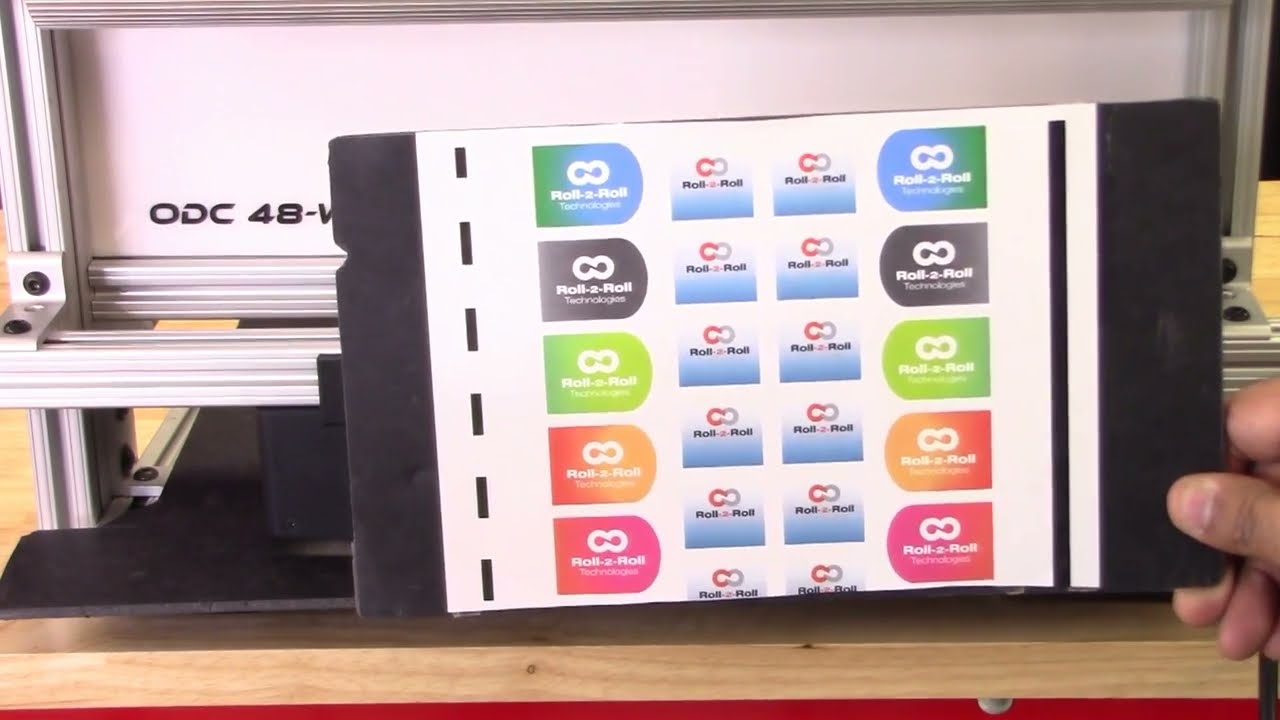
continuing along the lines of measuring the width of the web based on the contrasting feature in this video we're going to look at how we can measure the width based on some printing or contrasting feature on the web with two sensors so I've got a sample here with a whole bunch of features on the web not just the edge of the web the left side has a intermittent line of a certain width and then the right line right side has a solid line and then we have some labels with different edges with gradients and things like we can use any of these features to be able to measure the width of the web we don't necessarily need the edge of the web and as explained in the previous video These are relevant for certain applications where you want to measure the width of a coating or the width of a printed feature that might expand or contract differently than the edge of the web and then our sensors have the ability to be ability to do that so let's go into the controller and see how we can set this up we want to First make sure that both sensors are enabled and I've got both sensors enabled and I'm going to the operator sensor screen and we've got the sensor one and the Sensor 2 image as a first step what we are going to do is we're going to teach the teach Sensor 2 to look at that intermittent line and sensor one to look at the solid line and use that information to measure the width of the web so let's go to Sensor One sensor 1 has the solid line so we want to pick that line so I'm going to go in and pick the line mode and pick the feature that I want that's the solid feature that I want logged in on it now go into sensor 2. this is the intermittent line so if I move the web or remove the material you can see that the line disappears comes back in so I'm gonna pick that feature right there lock it in and then we have locked both the features but we don't know the distance between the two features so if we already know what the distance between the two features are then we can enter it so let's say it's eight inches is the distance between the two features I'm going to go in and teach it so the teaching procedure what it does is it teaches the controller to know that to know the distance would be in the two sensors if we don't do that then the output measurement is not it will be it will be proportional but it won't be the measurement so I'm going to go in and teach now I've got that measurement taught in as you can see on the web browser that the measurement now has updated to 8.002 inches and what I'm going to do is I'm going to move the sensor so maybe we can have a picture and you can see it there I'm going to move the sensor so that you can see how that width measurement changes oops there's the width measurement and when I move the sensor you can see that the width increased because I moved the sensor outside and now I'm going to move the sensor inside and you can see that the width goes down this way you can pretty much teach the controller to pick up any feature that you want and have the ability to track the width of the two features and teach the controller for the distance would be in the two sensors and then log the data we'll also look at how we can do the same thing with a different type of feature so we'll go into the controller operator sensor screen and then this is the intermittent line sensor so I'm gonna make sure to try to teach it to the edge of the label so I've got that label there put it on auto and I want to be able to teach that so we want to come in from this direction and pick that edge of the die-cut label there and I'm going to move this Sensor 2 and do the same thing sorry sensor 1 and do the same thing so this is the black line and this is the edge of the die cut label so we want to teach it to that want to go to that mode and pick that edge of the die cut label teach it to that teach it to that we need to make sure that this turns red and all the other features goes away that's when the controller says that the feed feature had been taught if it doesn't happen then the width will not have an output also what happens if we don't have it again if we go back and teach the distance between the two sensors so let's do that to be the same eight inches and if you go back into the web browser then you can see that's the width and if I move the sensor and you can see that on the top right hand corner if I move the sensor then the width increases or decreases so pretty much any feature that we could teach for in the contrast mode can be used to track the width of that contrasting or the combination of the contrasting feature one more thing I want to mention is that we want to make sure that the teaching is accepted by the controller if the teaching is not accepted then the width will not get recorded properly so for example if I go into the sensor screen go in here and then let's say the teaching was not accepted if the teaching was not accepted it's going to look like oops it's going to look like this even though it picked up the contrast the teaching is not accepted and if we go back to the home screen the width is going to be zero this is mainly because that in order to measure the with the contrast mode both sensors the contrast needs to be picked and thought so if we go back in and teach that contrasting feature for sensor one Sensor 2 also has that already and if you go back to the home screen you're going to see the width measurement and if you go back to the web browser you should also see that with the measurement there um that's essentially how we would set up the controller for web width measurement with two sensors and both sensors are in contrast mode and tracking a contrasting feature on either side of the web concludes our presentation about width measurement with either one sensor or two sensors with either Edge mode or contrast mode we also looked at the different outputs that we received from the controller with respect to analog digital and ethernet and with this you would be able to apply our products to a multiple different applications hope this information was useful and please subscribe to our Channel and for more information about our products and how they can be used in your application
Transcript
Show full transcript (1112 words)
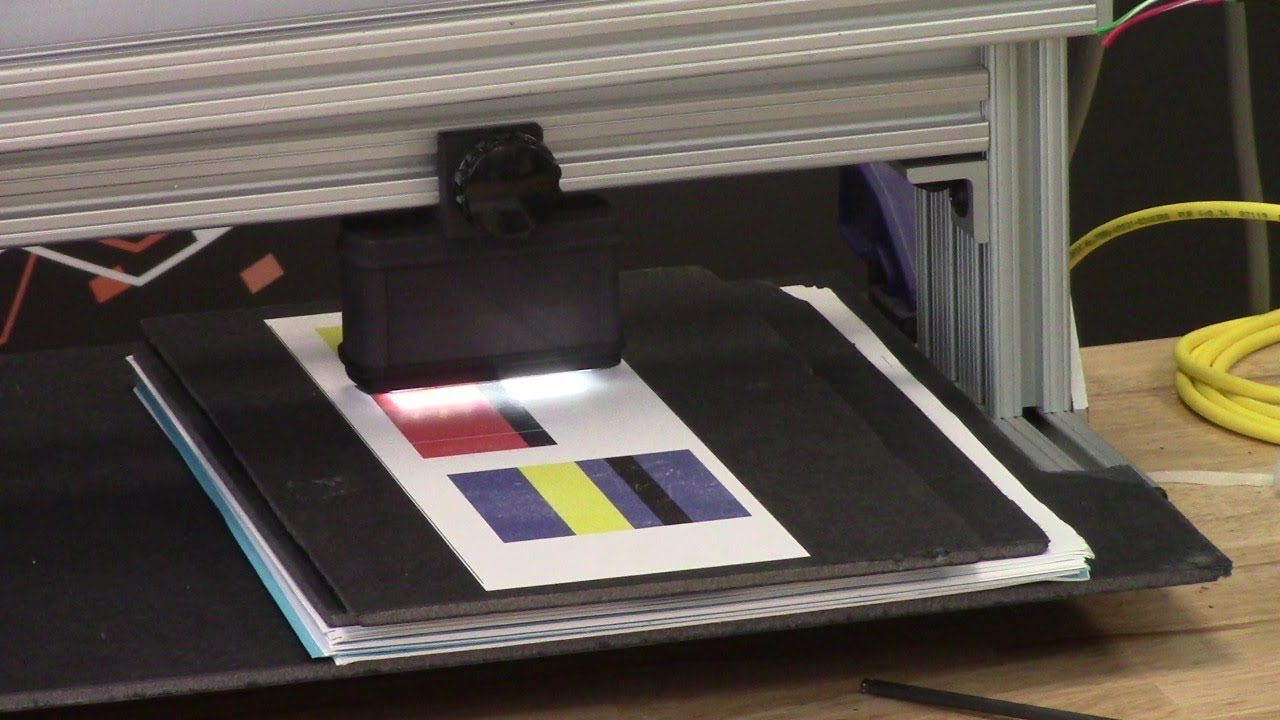
Hi, I'm Pedro Velasco with Rollto-roll Technologies. In a previous video, we showed you how to teach the SU5 controller for contrast sensing applications. Um, well, today we want to talk about a little bit about one of those applications, which is line guiding. Now, converters in specifically uh slitter uh slitters uh will actually find this information very useful.
Uh we have a different way of looking at line guiding. uh mostly because we realize that there are possible savings to this and there are special situations where uh converters might find it difficult to guide a material on certain contrasting features. So uh let me go ahead and switch over so that we can see both the screen of the SU5 and our WPS uh 48 sensor white light sensor that we use for uh uh contrast guiding. So in this case we have a uh the SU5 screen on the main screen and then we have on the right upper side the uh WPS48 white light sensor.
Now, when we're looking at typical line guiding applications, we'll see something similar to this where you're just looking at continuous line uh on a printed on a web. Well, we can actually eliminate the need to print that line and uh help you in saving money from having to print additional features on your web or even by reducing the width of the web. So, one of the things that we do is first we have to go through a teaching mode where I can show you what are the different uh ways of line guiding that we have. Our most typical way is just consider something as a line.
In this case, I have set up on our sensor a black line that is shown right here with red and white on the side. If I teach it to follow that, let me go back. Forget if I teach it to follow that. And then that green line right there tells you the feature that it is following.
So, as I move this around, you can see how the sensor is capturing where that line is at. Okay. However, what if we have a special feature such as this? We don't have a printed line, but we do have something interesting.
Our technology allows us to use the white space in between the labels here so that we can consider that as a line as it goes through. If we go into our teaching mode, we just maintain that same line, but then we say it tell it to move to that space that we wanted to follow. And every time it sees that space, it will capture. Now, right now, because I'm moving this by hand, let me find a better ride there.
It will capture again every times it sees it. Right. Of course, the the uh the web has to be very stable when it does this application or any application of line guiding or contrast sensing. One of the beauties of this is that we don't rely on the information from the operation such as uh web speed.
The controller and the sensor do all that for us or do that all for you. And in this case, every time it sees this, it sees the contrast that it's following, it will guide the material to that pos or it will guide the material to adjust for that position. And when it it loses it, it stops the web guide at its last position. And then every time it catches back on, it moves the web guide or allows it to move.
So that is one uh interesting feature. However, what about if you have a feature such as this one right here where you have labels that are irregular on one side, but they're a straight line on the other side. Well, we can use the same concept of guiding on that negative space by using this right here as the edge of a line right there. Right?
We do have that application here when we look at it. and we say let's look at that web and let's look at that feature right there but coming from this side. So as you can see this is the black space of the board right here. This is the white of the web right here and this is where the label starts to be.
So these are different features inside the label but we wanted to follow this particular line right there. So we teach it to go follow that. We in uh identify it right here with a with by moving with the arrows to the feature that we want. Then we accept that.
And as you can see there's a green light the green line that tells you that is the feature that it is following. And as it goes from label to label it just keeps on falling. Same condition as the other application. Whenever it loses it, it stops the web guide and when it catches back again, it activates the web guide again.
Now, another one that we have is where we look at two contrasting features which can be shown by this right here. So, let's say I am interested in following wherever there's the red and the black. So I can actually teach that position and I do it by selecting this mode right here. And then I go and look for that condition right there.
Accept it. And then you see the green light right there. The green line where it meets the red meets the black. And wherever it sees that it will follow it.
Now if it goes to something that is different than that it will lose track of it. But once it sees it again it will again continue to monitor that position right there. Right. So those are the features that we have for contrast sensing for specifically the line guiding application.
Now, we have other ways of dealing with contrast sensing and line guiding. If you find this information useful and would like to know more, just contact us at r2r.te. Now remember, we have applications that allow you to follow a uh a line that is not continuous and doesn't require to do any specific setups on your line to feed information to our controller. Our controller works on its own.
If you like this video, just give us a like on YouTube and uh we hope to that this has been very informative for you. Keep a lookout for other videos that we will presenting in the near future.
Web Guiding Fundamentals: Topics in this webinar
- Web guiding Terminology
- Why we need web guides?
- Types of web guides: Terminal and Intermediate web guides
- Normal entry rule
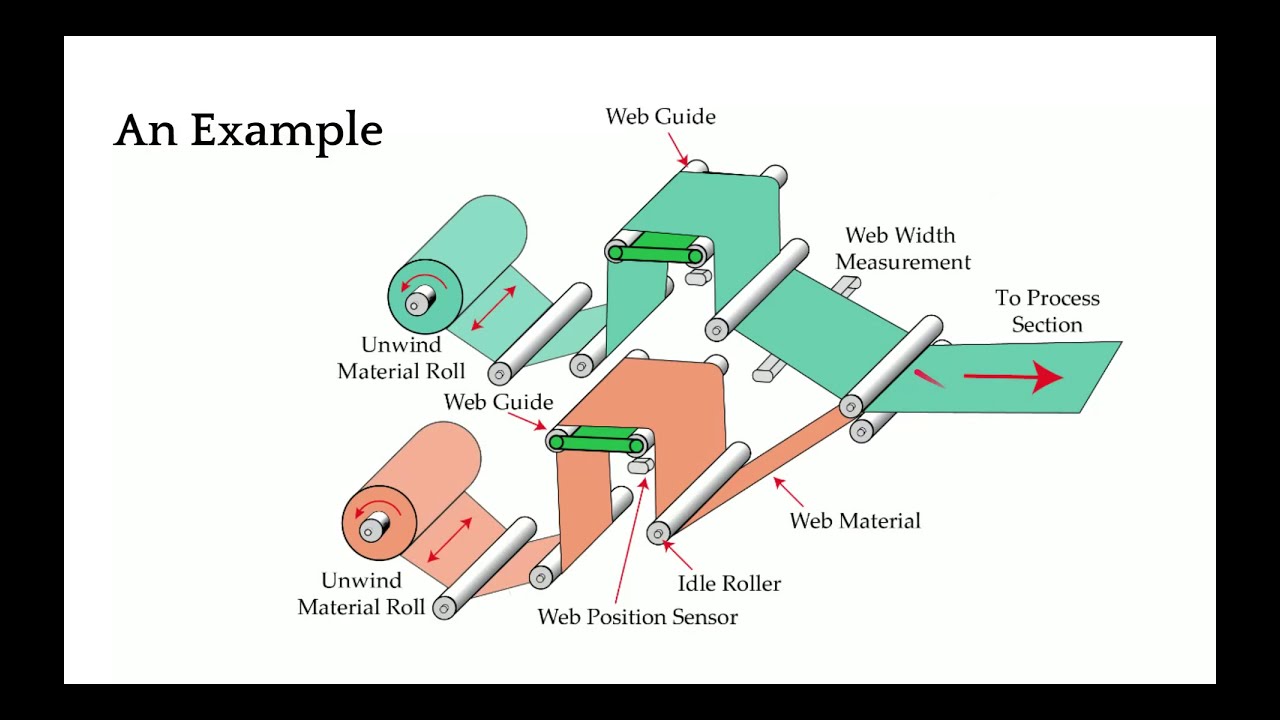
- Main components of a web guiding system
- Unwind web guide structure
- Rewind web guide structure
- Terminal web guides design and installation considerations
- Offset-pivot guide or displacement guide design and installation considerations
- Steering or remotely pivoted web guide design and installation con
Transcript
Show full transcript (10460 words)
is going to be recorded and then we will also share the link once the webinar is done so that we can you can take a look at it after afterwards I will be your presenter I am Arvind Seshadri I'm a troll to role technologies just to give you a background I have been with troll troll for almost 6 years now and before that I was at Oklahoma State University I got my PhD in mechanical and aerospace engineering specializing in dynamics and control of roll-to-roll machines so topics such as web guiding tension control registration or some of the things that are unfamiliar with as we go along in this presentation we'll also have some polls or some questions so that we get to know a little bit more about you and what are some of the problems and hopefully we can take advantage of that and guide the presentation along the way once again we're about ready to start the webinar and as part of that let me just give you a quick poll if you can answer that really quick in the next minute or so that will help me in terms of some of the topics that will be covered today and we can look at how we can tailor that to the audience so basically we just wanted to know a little bit more about your knowledge about web guiding there are some people who might have no knowledge about web guiding there are some who might just know what a web guide is how it works or some of them are well versed in being a designer they can design web guides or design web guides into their machines or some of them could be even experts that are called upon when where you have any issues with web guiding in your operation so I'll give a just a quick minute or 30 seconds to make sure that everybody had a to answer this question okay seems like we have a pretty good mix of audience here people ranging from as people with no knowledge about web guiding and also some experts and web guiding okay thank you for taking that poll that gives me a pretty good idea on how we can proceed with the presentation okay so before we start web guiding let's just look at some of the common terminologies or names that are used for web guiding web guiding is also referred to as steering some people call us tracking depending upon whether we are guiding the edge of the web or a feature on the web it might be called as edge guiding line guiding contrast guiding more technical term would be like lateral control or lateral registration these are some common terms that are used in the academia when we are talking about guiding sometimes it's also called as CD registration CD where see these stands for cross machine Direction registration and then lateral alignment and if you're from eastern part of the world in Asia it's commonly referred to as EPC or edge position control or line position control essentially all of this means the same thing that is guiding or a web guide is used to position the web at the desired cross machine direction and it is done so that we can enable efficient transport if the web is not guided then we have issues with the web crashing into the machine quality issues wastes and things like that so why do we need web guiding all their army fully mainly for reasons why we need web guiding first and foremost is that materials are not perfect you might have a poorly bound roll that is not one properly or deliberately wound row with an oscillation on it and when we are trying to feed it into your role to the old machine you need to guide it so that it aligns with your process some materials may have thickness variation this could be like gauge band variation either during coding or forming processes especially with paper mills different gauge papers may track differently or slide differently splices whenever you have change from one role to another when you are joining two roles of web it might be a step change or it might also be like an angular misalignment of the splice and then some materials have a natural curvature to them which is called as camber so the material properties when the materials are not perfect that's going to have the web miss track in your machine it could also be due to machine itself so either you have machines with out of round rollers like a crown or a concave or a convex roller whenever you have a variation in the diameter of the roller that's a problem or the rollers are not aligned properly with respect to each other that could also cause the webs to miss track you might also have tension control issues and if you don't have enough tension you don't have traction then that's going to be an issue and whenever you have acceleration or deceleration that might also cause the web to miss track it could also be due to processes for example if you have a coding process and you have uneven coding across the width of the web that's going to cause issues with tracking and also some processes where you could have air entrained between the web and the roller that would cause the web to loose fraction and miss track so that could also be an issue and that's why we need web carry finally operators mainly when they are splicing the web or when they are putting a new parent role into their roll-to-roll machine they may not Center it or they may not put it at the right location that might also cause an issue and that might need web guiding so web guides are necessary at different locations of the machine because you might need alignment at different parts of the machine so that's that's the main thing with web guiding is you have to put a web guide in front of any process that requires web alignment just to give you an example let's say you are laminating something and we have two layers of web coming in to this lamination process at this point you would need a web guide so that you can online this layer and this layer with respect to each other the guides that are used within the machine or called as intermediate guides or they are intermediate to the machine and the guides that are used at the entry and exit of the machines or call as terminal guides so we're going to look at all of these in detail but that gives you an idea of why we need web guides and where we need web guides in terms of the location as I mentioned when you have a web guide that that is located at the entry and exit of the machine they are called as terminal web guides there are lots of names for these and some of the common names are shifting stand a shifting base a shifting side lay on role positioning stands if you're in the metals industry it might be uncoil or recoil and in other industries it might be called pay off and tension real and specifically in these presentations and in our terminologies we call them as unwind and rewind guide an unwind guide is something that is at the entry of your old troll machine while a rewind guide is at the winder or the exit of a roll-to-roll machine so these are some of the terms that are used for terminal guides and in terms of intermediate guides these are the web guides that are used within the process within the machine there are certainly multiple types of these web guides and the most common one is what is called as an offset pivot guide other names for opposite favorite guides or displacement guides positive displacement guide pivot frame or a table guide the second most commonly used intermediate web guide is a remotely pivoted guide that's a technical norm at term but most commonly it's called as a steering guide or steering roller or a swivel roller and then there are other less common web guides like an pivoted guide or center pivoted guide and then even turn bars are all available well we'll take a little bit deeper look at all of these different kinds as we go along in this presentation but most of these web guides work on a basic fundamental principle and that is what we call it as normal entry so what is normal entry say normal entry is basically is a web approaching a roller will always align itself perpendicular to the axis of rotation of the roller as you see in this video right here let me restart that as soon as the the roller on the left has a misalignment the web started to track and it started to move in such a way that it will approach the roller on the Left perpendicular to the axis of the rotation this is the fundamental principle that is used in most of the intermediate web bags that we are going to see and what's happening here is that the web is essentially behaving like a beam and the angular displacement on this left-hand side is bending the team and it's causing the beam to bend and that's what it's causing the web to track to this side there are lots of dynamics involved in this process how fast the web moves how much does it move all of those depends upon the transport conditions the what type of web it is what kind of traction you have and things like that and obviously the static behavior is that at steady state once this angle is said how much is it going to move are we going to see any movement on this side as you can notice that when this web moved the upstream roller the web was still there it was maintaining there because it was able to have enough traction so that the lateral forces at the moment that is acting there was not able to make the web move and whenever we have a motion like this bending occurs bending in term means that there are stresses developed in the web so you're going to have a tight side and a slack side and there going to be a tension profile here so these are important to understand for us in order to have a successful web guiding application or execution of a web cam so in terms of a basic web guiding system we are mainly dealing with four main items apart from the web we're mainly dealing with four main items one is the guide structure or the mechanism this is the device that is actually making contact with the web and that's the one that is need to be moved or it moves the web and there are different types of guide structures that we will go through the other component of web guiding system is an actuator so actuator is something that takes an electrical signal and then it converts that into physical motion so that it moves the guide structure so that the web can be loved rated at the desired location the third and one of the most important components of a web guiding system is a sensor the sensor is the device that provides the feedback the sensor is the one that tells us where the web is where means it's inferring the position and then finally that signal is sent to a controller and the controller is made mainly the intelligence or the brains that that takes that sensor signal and computes the corrective action that is acquired so that the actuator can move the guide mechanism to the location where we can get the desired web position again another schematic of how the components of the web guides are so web is a part of the web guiding system and then you have the mechanism there's an actuator inside the mechanism the sensor gets the position feedback of where the web is sends that information to the controller controller then computes an error and it sends the command to the actuator so that the mechanism can be moved to position the web at the right location so this is a closed-loop feedback control system that is a main part of a web guiding system so let's dive into detail about different components of the web guide first we'll start off with guide structures and look at how guide structures are with different types of web guides that we saw so first and foremost we have the unwind web guide structure in this case you have a parent role and that is feeding the web into your machine and this role is on a shifting stand or a base that is supported by typically linear bearings and then there's an actuator there that connects the moving state and with the fixed base and then there's a sensor here that is looking at the position of the web so the main objective of an unwind web guide is to ensure that the web that is fed into the process is at the desired location and because of that you have a fixed sensor that is fixed to a machine frame and then this stand actually moves in and out of the monitor that we have here it's going to go in and out and the the feedback from the sensors used to make this unwind guide move in and out so that it can position at the right location one thing I wanted to point out is that the there is a shifting idler when I say shifting idler it means that this idler is attached to this moving base the main reason why we do that is that if we put a sensor right here it is not an ideal location just because of the fact that when the diameter of this roller changes you're going to have the web plane go in and out and if that happens that's going to affect your guiding so typically you would see a shifting idler I doesn't have to be one it can be multiple it could also be a whole frame with a lot of rollers here all that we need to do is that we need to put the sensor just downstream of the last shifting idler and then the sensor is fixed to the Machine frame so that we can guide the web so those are the main things with an unwind guide now when we look at rewind guide rewind even though we call it as a guiding it's not actually guiding the web it's actually chasing the web so the the the main thing that is unique about this is that in a rewind system you have a sensor that is attached to the rewind frame all of the things in terms of the carriage it's exactly the same you have a sensor that is attached to the rewind stand so that when the rewind moves the sensor also moves and then you have a fixed idler right after this this moving sensor like I mentioned rewind is not really guiding the web it's actually chasing the web and the main reason why we do that is that we need to maintain the relative position of the web and the rewind role and if we put the sensor on a fixed frame and look at this rewind role then we will not know the relative position between those two that's the main reason why we attach the sensor on to the moving rewind stand so that the sensor gives us indirectly the position of the rewind stand and the objective is to make sure that we move the rewind stand so that the middle of the sensor or the guide point of the sensor matches to the location of the web again like I mentioned it's not really guiding the web we are chasing the web so that the the rewind role would be at the right location to get the web bound properly so just to summarize about these two terminal guides we can look at what are the things that we need to have a good rewind or unwind guiding system first of all in terms of design we need to make sure that the mechanical structure and rigidity and stiffness or design properly we are moving a big mass and depending upon the type of web maybe metals it may be thousands of pounds multiple thousands of pounds that we are trying to move and we need to make sure that the structure is rigid enough so that we can avoid any mechanical resonance so the natural frequency of the structure should be at least three to four times the operating frequency of the control system the other thing we need to consider especially with these kind of guides is that we need to size the actuator properly when we talk about sizing the actuator what we are talking about is it should have enough thrust so that it can push the mass it has enough thrust to overcome the static friction and it also has enough thrust to provide the desired acceleration to reject the disturbances or errors that may be there just like the mechanical structural rigidity we need to also make sure that the actuator coupling and the actuator stiffness are all counted for any play in the actuator coupling is going to reduce the stiffness of the overall system that's going to destabilize your system in terms of installation consideration the main thing that we want to look for in these type of guides is the location of the sensor with respect to the moving Stan either it's fixed to the machine frame or it's it moving with the machine with the carriage that's the main thing these web guides are simple that's one of the advantages of these web guides and these web guides really do not have to take advantage of the normal integral because all the rollers there are parallel to each other so there's not going to be any misalignment in them so there's going to be less amount of stresses on the web the disadvantages with these kind of web guides well first of all you need a high thrust actuator especially when you have a larger mass to move and it's not cost-effective if you really want good performance from a web guide if you wanted to reject the high frequency disturbance then this might not be a good choice for us now moving over to intermediate web guides we have a displacement web guide this is another type of one of the most commonly used web guide that you are going to see and we would recommend this as the first choice for any web guiding application one of the main reasons for that is it actually displaces the web and in this Web guide it's it's not bending the web the reason why it's not bending the web is you have this entry span and you have a 90 degree wrap and then you have the plane of the carriage right here when this carriage pivots the pivot point is shown here but that's a mistake it should have been right at the edge of right here so when when this carriage rotates pivots about the pivot point which is at this point right there these two rollers are actually moving in tandem so there's no bending in this region and then in these pans since they are perpendicular that motion is a pure twist so really there is no bending in this kind of a web guide and if the web guide is designed properly then these web guides can have one to one ratio in the sense that if you move the web guide one unit then the web will actually move one unit so that's why we we call them as a perfect web guide and I do see a question here that says that would you agree that an offset period guide acts on a different principle other than normal entry that is correct and just like I explained because these two rollers are parallel to each other there is no bending in the span and since these two entry and exit rollers are perpendicular or the wrap angle are perpendicular this span is perpendicular to the plane of motion of the web guide they are going to be in twist so there's no bending and when there is no bending there's no normal entry coming into picture there so like I mentioned the twist is an important design part and and this would be our first choice for us in terms of applying it in any web web guiding situation so in stones of installation again we want to make sure that we have a 90 degree rap at the entry and exit of the roller and then there are some considerations on how what is the span length at the entry and exit so usually you can get away with half a web width usually we recommend about one to do web bits if possible and if you have a stiffer web like metals like you might need much longer entry and exit span we want to locate the sensor as close as possible this is true for any web guide it doesn't matter if it's displacement guide unwind guide rewind guide any web guide we want to have the sensor as close as possible in the span where the guiding action takes place and then in this case the recommendation is to be within the first half of the exit span and then how long this span really depends upon how much correction you're looking for typically these carriages are allowed to pivot only about five to ten degrees so if you want larger correction then you can make these pants longer the main thing is that you need to make sure that the plane of motion of the carriage is perpendicular to the entry and exit span so that you can create a pure twist on these spans and then as long as these rollers are moving in tandem or parallel to each other then we will have the desired effect they don't have to be on the same carriage they can be on different carriages as long as we are able to move have them parallel to each other you can even have a process here you don't really have to have just two rollers you can have multiple rollers so it provides a lot of flexibility here and and and and the guiding action is actually happening in the exit span so what not to do so we don't want to install the sensor too far away or we don't want to install the sensor in the next pan this is mainly for control system purposes and stability so when the web guide makes a corrective action that action is not seen at the sensor immediately so if you're running really fast you might get away with moving these sensor it's a little farther down but if you're running slow whenever this Web guide moves here you would see that motion if the sensor is as close to the down to the exit roller as possible if you install it here or here especially when the web stops and there is a small error the web guide would keep moving and that might cause the web to break or have unintended consequences so we don't really want to have the sensor further away or a next ban and we don't even we don't also want to have a scenario where you have an angle that is not ninety degrees so as I mentioned if you have a ninety degree wrap you have twists as soon as you introduce something which is deviating more from the 90 degree you start creating bending in the web so these kind of bending is going to act as understeering the web it's going to cause bending that's going to understeer the web and it also causes distortions and guide instability so we don't really want to have any of these conditions on the contrary if you have a span exit span that is spread out like this this is going to oversteer the web again it's the bending effect that is causing that and we really don't want to do that so ideal scenario would be to have a 90 degree wrap in and out but there are other options for wrapping the web there you don't have to have it just like this what like how we showed it's an inverted u configuration you can have the web going like this or like this like a Z configuration depending upon the space and all those things and obviously you can rotate all of these 90 degrees upside down just rotate all of them so you would have about 16 different configurations that you can do with these webpage all in all need to make sure that the entry and exit span or perpendicular to the plane of motion of the web guide and all of these conditions satisfy that have the sensor as close to the web guide as possible we can satisfy that and then you can have multiple configurations for these so in summary the displacement guide the main design consideration when when somebody is asked to design a web guide displacement guide is what is the desired correction then that kind of determines our span length for the guide span other than that in in terms of installation it really depends upon how much space you have so you can design the entry in the exit span and then if you have a stiffer web you might have to exaggerate that entry and exit span make sure that we have 90-degree wrap and then wrap the web guide based on the path so one of the other parts would be in the same direction the web came in and things like that advantages these are simple to install the proper installation imports the least amount of stress on the web and then it's pretty versatile I put a disadvantage there but it's really not a disadvantage but I do want to have I do want to have that here it's like the the maximum correction that you can get is designed in so in another type of web guide where we can take advantage of steering or our bending we can get more than what the guide moves so the second choice for us would be a steering guide and in in in terms of how it works it's a little bit different you got a single roller and this is the top view and this is kind of the side view and this roller is installed on two raceways they are at an angle so the web can actually forms an arc like that so it moves and forms an arc back and forth that's that's the that's how we are changing the axis of rotation and in this Web guide we are creating a bending so there's a bending action here it's displacing as well as bending then in terms of the entry and the exit span there are some guidelines for that as well and we'll go through that this is not an ideal choice for us or this is not our first choice because as I said it's bending it so it's introducing stress if it's not installed properly it can cause wrinkles creasing web tear and edge quality edge stresses and things like that so I just wanted to stop quickly and answer a couple of questions how do we determine the minimum entry and exit span that really depends upon your stiffness of the web and things like that the average stress there is a guidelines for that that I can share later on but it really depends upon the tension the Youngs modulus of the web and then the width of the web and then the span length so there is a formula where we can get the minimum entry and exit span links and the entry and exit span need not be the same like they can have different lengths also how do you determine the correct length of the displaced displacement guide table or the guide table length is basically based on how much correction that you need like I mentioned usually the tables are made to rotate about 5 to 15 degrees so so the displacement that you need need would be let's say L is the length of the span on the guide table and theta would be the angle of displacement the correction would be L sine theta theta so that is the maximum correction you can get so based on what maximum correction you need you can get the length of the the guides ya the guide span on a displacement guide and theta is the upper limit we can say 15 degrees so okay switching back to the steering guide in terms of installation what do we need to look for well we need to make sure that the exit span is perpendicular to the plane of motion of the web guide so again the main thing that we are trying to do with this is to make sure that the exit span is in pure twist this is where the this allows us to have the least amount of stress in the web so we want to do that now the entry and the exit span length of that is also depending upon the stiffness of the web you typically need a longer entry span for a rewind guide because the that the motion of the web guide or the displacement of the web happens because of bending and so you have to follow those guidelines in terms of if you have a stiffer web you need to have a longer span so that you can allow the bending to happen but normally it's about one to five times the width of the web and then the exit span can be half a web width and there's also minimum formula for finding out the minimum spanning there in terms of other things here let me go back here and talk a little bit about the instant sender like I mentioned there is a race way to race race here and they are angled so that you can have the web guide go around an arc and the center of the arc is called the instant Center this is important we need to make sure that the instant center is within the span and it's at a certain distance about half the length of the span or up to two-thirds the length of the span again these are all numbers coming from the dynamic model of the web guide and the dynamics of the web itself and if you don't follow those conditions then you can have a web guide oversteering understeering creating an awful lot of stresses may be wrinkled slack edges tight edges and all those kind of things so but the main things that we want to look for is this angle make sure that it's 90 degrees and then you have an entry span that is pretty long you can have different wrap here we don't want to go more than 45 degrees on either side that is fine when you do that what you're doing is you're adding a twisting per se so whenever it goes away from this 90 degrees it's not pure bending that is bending and twisting that isn't Maul there and then we want to have an angle here because again when you put bending stresses here you have the possibility of that what we call its moment transfer occur here so the motion of this roller can actually move the web upstream of the guide roller so in order to avoid that we want to have certain conditions here and then we also want this span shorter so that it becomes harder for that moment transfer to occur so those are some of the guidelines for installation of a steering guide and again sensor as close as possible now what not to do same thing we don't want to put the sensor too far away one of the things that is not really evident is that we don't want to put the plane of motion of the web guide at anything other than 90 degrees it's not this angle between the entry and the exit span that needs to be 90 degrees it's actually the angle of the plane of motion of web guide and the exit roller that's what determines whether you're going to have a twisting action that's going to happen here or not so when you when you have something like that you're going to introduce bending in this span and when you start bending a short span it's not a good sign so we don't really want to do that so that's the main reason why we need to have the plane of motion perpendicular not really the entry and the exit span but the plane of motion and then like I mentioned if you have the entry span and the pre entry span longer then the entry span then you could have moment transfer happening that's something that you don't want to do either in terms of wrap angles are pretty simple you can have something going up like that or going down like that as long as we follow this condition that exit span is perpendicular to the plane of motion then we are in good shape just to summarize the design consideration desired correction is one of the main things there and the raceways that we have on the steering guides we don't want to angle them more than 25 degrees so anywhere between the like 5 to 20 degrees would be the ideal one in terms of installation steering guide is lot more complicated to install you have to consider the stiffness of the web that determines the entry span length and then you also need to make sure that you're not putting too much bending stress on the web based on how stiff your web is and then the location of the instance center which depends upon the raceway angles again that depends upon the length of the entry span so there are lots of things going on here that we need to consider for proper installation of a steering guide and that's one of the reasons why these web guides are prone to have a lot of issues because they're not properly installed in terms of advantages there they are simple so they're cost-effective it's just a single roller so it's it's it's inexpensive but it comes with other things that increase the overall cost of ownership it's hard to install a lot of attention to detail is required and a lot of these have especially because of the bending and things like that loss of traction or anything like a moment transfer occurring can actually amplify the error so a poorly installed or poorly designed steering guide can actually produce error more amplify the error then then what it's intended to do there are a few other types of web guides there are not used commonly but they are Center pivoted guide again they are going to use the normal entry rule to try to steer or guide the web so there's bending that's going to happen so we're going to have similar considerations in terms of entry span pre-entry span and exiting span because they don't have any displacement like in a steering guide you displace and change the angle of rotation in these guides it's only the angle of rotation they are usually really slow in terms of response they're not an ideal choice in in modern guiding principles but the same design considerations have to be followed whereas in a steering guide so that kind of gives us a quick summary about different web guides and how to install them and things like that so the next part of web guiding is the actuators so in terms of actuators there are lots of terminology there is involved and some of them are thrust or power how fast the accelerator is what is the correction speed what is the acceleration stroke lling mounting what type of coupling that we have and things like that actuators are pretty common or pretty standard right now it's not as as installation of a web guide or the sensor but it is an important part of a web guiding system the older actuators were either pneumatic or hydraulic you had a hydraulic pump pumping a double-acting cylinder and moving the the web guide structure these were more common in the 50s and up to about maybe 90s before the electronic electromechanical actuators started coming into the market so you could have pneumatic actuators or hydraulic actuators the hydraulic actuators have the advantage that it can provide pretty high trust and can shift large loads pretty quickly even now in metals industry hydraulic actuators are pretty common you can see them but the problems are that it's a problem with maintenance you need to balance the valves and stuff like that change the filters they could cost leak and this could contaminate your product and then the precision and accuracy that you can get with an electronic actuator or electric actuator is not something that you can expect in an hydraulic actuator so most web guides nowadays are going to use electromechanical actuators like what I have shown here these actuators usually have a motor that drives a belt pulley kind of a system and there's usually a lead screw a ball screw or a roller screw that converts the rotary motion into linear motion at the end of the actuator so some some common terminologies that you would see with actuators are what is the maximum current voltage power whenever we have something with the lead screw or a pitch then that's a common term that you're going to see what is the lead of the actuator pitch of the actuator gearing ratio backlash is another thing that you would commonly see with electric actuators especially with low end lead screw actuators and resolution again what is the smallest movement that an actuator can produce that's another term bad drive is some a common terminology that you would see especially if you are installing a web guide that has to work against gravity and then types of actuators you have inline and reverse parallel some actuators have limit switches or n stops and then type of motor used in the actuator you would commonly see servos stepper brushed or brushless DC motor so actuators are providing the driving force to the guide structure so that it can position the web in terms of trust the trust is the amount of force that is exerted by the actuator to move the guide structure and this trust really depends upon as we saw before mass of the structure that we are trying to move what is the friction there how fast you want to move and sometimes gravity as well if you are acting against gravity in terms of sizing actuators these are some of the things that we would need to know to size an actuator properly web blind speed mainly because if you have a slow-moving web the the the the maximum disturbance frequency that you can get really depends upon the speed of transport of the web so if you're just moving at 100 feet per minute you might not need a high dynamic response while if you are moving at really high speed you might need a much higher dynamic response that's the main reason why we need that and then the the dynamic response is related to the acceleration acceleration is related to the thrust so that's why line speed becomes important guide structure weight and roll weight again if you are trying to move a big mass we need to know that what type of bearing you are using so that what is the breakaway force that we need to overcome based on the coefficient of friction of the bearing and then what kind of disturbances we are trying to correct for again like I said they there is a correlation between the amount of disturbance that can propagate through a roll-to-roll machine and that really depends upon the speed of the web the faster you go higher frequency disturbances can go through so the web access like a low-pass filter and then the acceleration and then if you have to look at any gravitational effects so these are some of the key factors that are involved in properly sizing an actuator but like I said actuators are pretty straightforward nowadays just need to have some basic questions answered and then we'll be good to go one of the most important parts of web guiding system is the sensor it is important because what you can't measure you can't control so if you have a poor sensor and you're not able to measure the position properly then there's no way that we can get the accuracy that we need in terms of sensor terminologies range resolution accuracy linearity those are some things that you would see type of sensors infrared optical ultrasonic air type of things that you are trying to look for in terms of web position or you're trying to look at edge of a web or you're trying to look for a line on the web or a contrasting feature on the web how much how fast can the sensor measure and then passed line and plane change these are not important nowadays but older ultrasonic sensors have issues with passed line changes so you can't have the web too close to the ultrasonic emitter because it might reflect the sound waves in a way that doesn't provide an accurate measurement and then temperature drift again ultrasonic sensors can have issues with temperature drift when we have the piezoelectric crystal frequency changes then what kind of a signal output that you get from the sensor that's some of the terminologies so essentially a range of a sensor is what is the maximum lateral displacement that the sensor can measure a most often for web guiding applications range is not that important just because of the fact that you're controlling you're going to bring it in but it does become a critical when you have web with changes and things like that so most often range is like how much change in the lateral position that you can measure with the sensor resolution is the minimum lateral position change that the sensor can see so if you want to guide a web to five thousandth of a inch then you better have it a sensor that can have 4 X or 2x higher resolution than the guiding accuracy accuracy is basically an indication of how close the sensor measurement is to the real measurement this becomes important for certain types of sensors that are affected by materials material properties like opacity porosity and things like that so this is an important characteristic of a sensor and then linearity is like what how consistent is your measurement with respect to the actual position across the entire range of the sensor that's what linearity means so in terms of sensing why is it important like I mentioned some sensors have issues with material properties like opacity porosity or reflectivity or they may be affected by environmental issues such as air flow temperature changes or vacuum and things like that so if we can't measure we can't control so that's why sensing is an important part of having a good guiding performance most often you would see these type of sensors we refer to as opposing beam or fork-style or horseshoe style there are lots of different names for it basically how this works is you have a one omitting a certain type of signal and the other arm receiving that signal and then the web that goes in between it blocks it it's a pretty simple technology work sensing principle and it works well for a lot of different cases the problem happens whenever depending upon this type of sensor signal that you have if the web allows that signal to leak through when it went when it's blocked by the web that's where the problem act occurs so we talked about linearity the solution range all of those things are affected by this kind of sensor whenever that change occurs this sensing signal can be air it could be optical like visible light or infrared light or even UV light and then it could also be sound like ultrasonic it really doesn't matter and then whether this material is opaque or porous to that signal is what it matters in terms of how well you can guide and often manufacturers recommend different sensors for different materials and different conditions so you will have a plethora of sensing technologies out there like I said the main disadvantages is material dependent gain change occurs and then requires calibration if you want to get a really good guiding performance there are other sensor technologies out there like ours which are not affected by material properties and some of the environmental conditions I'm not going to go into detail about our sensor technology here but just going to give you a quick overview it's basically a high accuracy direct measurement or absolute measurement and then our resolution does not depend upon the range and it can work with any material I'll give you some resources the end of the presentation so that you can take a look at our stuff so that's the sensor so finally the final component of the web guiding system is the controller so the controller is basically the central processor sir that takes the sensor input and then computes what the corrective action needs to be and then it sends that information to the actuator nowadays the controllers also include a human machine interface like an operator interface but previously the controller could be standalone it doesn't really didn't really have an interface and even the controller could be analog in a sense of electrical analog or pneumatic analog controllers so basically a controller is taking the sensor signal and then making the necessary computation so that the actuator can be positioned at the desired location in terms of terminology gain is one of the most common things that you're going to hear in controllers that's basically saying how quickly or what kind of a dynamic response that you need that's basically the gain is going to do that other things that you're going to see is operating voltage power consumption whether you have a operator interface or not and then whether this is a controller for a servo motor or stepper motor or whatever that is they have drives or drivers for it how many sensor inputs you have does it have Ethernet connectivity does it have remote control and stuff like that in terms of the control structure most control systems have web guide control systems have this kind of a structure where you have a fixed gain proportional control and you really don't need anything more than a proportional control for a web guide because there's integrator built into it but usually you have something like you have a motor it might have a current loop it might also have a velocity loop with a tachometer or something like that and then you have a guide structure which has its own transmission ratio and there's the web dynamic which is unknown web dynamics means that if you move the guide 1mm how much is the web going to move that really depends upon transport conditions the stiffness of the web tension and all those kind of things and then finally you have a sensor that measures the edge position and then it sends that to a position controller that's going to drive all of these loops so this is a pretty simple architecture for most web guide controllers they are fixed gain and most often they are detuned because of the stability and all the other reasons most web guides their controller is kind of detuned for the conditions if you want to get the best out of it you would need to retune them and the tuning has to be based on the optimal performance because the web dynamics is unknown most often DC motors or DC servo motors or stepper motors are used in this kind of a control structure it's pretty common there are some other advanced control technologies which are like adaptive control where the controller can adapt or learn on the fly and tuning may not be required when we say learning on the fly it means that maybe it adapts to sensor gain changes or the sensor the dynamics of the web and all those kind of things it's possible that we can have a controller that can adapt in our case we have a pretty similar structure as the one I showed in the first one it's still a fixed game controller but with with some motion control aspects built into it in terms of s curving the position and having trajectories for velocity we can increase the stability of the controller and provide a pretty aggressive output performance again pretty similar you can have a current loop a position loop if you have an encoder and then position of the actuator here and then the finally the the web position which includes the web dynamics just to give you an idea we have a lot of different things that we can do with the controller but the dynamics is basically if you move the this is showing a step response open-loop step response for a web this was like a nonwoven web that we had at different speeds and see how it behaves and you can see that when you have a step it I mean even though it's open-loop it's trying to get there and and the dynamics open loop dynamics is different based on how fast you're running so faster you are running it gets to that desired location as fast as possible but the slower you are running it takes longer to get to that desired location again this is an open loop response this is the the the final part of the whole web guiding thing which is the dynamics of the web now if we have add a controller to it and this was our controller then we can have a much better response and we can actually push the web guide in this case at the two different speeds that we were running at this was the reference change and this was the actual response of the web guide at the sensor and then when we have another sensor installed one span downstream you can see how long it takes for that to go to again when we have a step response you can we were able to get up to about 170 millimeters per second or like seven inches per second this is about close to 70 percent improvement over an open-loop response and again this is closed-loop that means you are actually actively guiding the web so with the proper control structure design you can get like a high bandwidth system close to six Hertz or something like that and then even get a well damped system so you can actually have an aggressive correction if you need to in terms of the characteristics of a good web guiding system is that it should have the ability to attenuate disturbances easy to tune obviously it needs to be stable has good processing power so that it can process multiple sensors have industrial Ethernet connectivity these are for advanced functionalities and then sparks and intelligence for industry 4.0 so the final question here is that well you have a web guide and we talked about all these different things what is the accuracy or how how accurately can you guide a web it actually depends like I mentioned there are lots of different parameters there that are going to affect the accuracy of the web guide at them if you are just dealing with the steady-state error we can expect plus or minus 0.25 millimeters if you have a good machine and a perfect material this is what you can expect and higher accuracies are possible like in printed electronics and stuff like that you can get much higher accuracy but again we're dealing with steady-state errors you have a good edge and all those kind of things this is possible but the problem is that most web guides are going to come in to transient errors these are either disturbances or materials or material properties that are going to affect the the disturbance at the web guide now if you are trying to correct a transient error it really depends upon what is the magnitude of the error what is the frequency of the error and so on and so forth and another important thing that we need to consider is that these transient errors can actually propagate downstream of the sensor and these are called what are called as V generation even though you correct it at the sensor you don't really know the angle at which the web is approaching and that can cause what is called as waves downstream again if you you won't have good guiding performance if you have wrinkles I mean if the web is wrinkling that is going to cost the edge to move back and forth there's no way that you can have good guiding performance with that or edge girl or flutter or sometimes plane change can also have that effect if you have large magnitude later and your stroke of the actuator is limited or the correction that the WebKit can provide is limited then you can expect good guiding performance whenever the actuator pops out on either side of its stroke again if you use a lower bandwidth actuator and you have a higher frequency error you can expect good guiding performances and sensor if you don't have a good sensor or if it has gain changes then you can expect good guiding performance and then improper installation can actually amplify the error so that's another thing that we can't expect anyway so just to summarize the factors affecting we talked about a machine related process related material related and the web guide related which is like the stroke deadband actuator backlash correction stroke limit and things like that so in terms of design requirement a good knowledge of the conditions like web speed location thickness stiffness environment tension desired correction all of these are important for us to have a good well-designed web guide and then obviously if you have a good understanding of all of these we will do well I know we're running out of time this is my last slide and I just wanted to bring this up to summarize it just to summarize our fundamentals of web guiding well web's machines process nothing is going to be perfect so we do mostly we need web guides to correct for it most of the web guiding or the the traction or the steering of the web happens because of the normal entry rule so whenever you have a misaligned roller or an out of round roll all of those things are going to affect the the disturbance created within the machine the sensors when you're installing it on a web guide we need to be installed as close as possible to the web guide and then the web guide has to be located as close to the process that needs alignment we cannot have an unwind and have a guide on the unwind and then have ten spans later you have a process where you meet see where you need the alignment we need to have the web guide right next to the process where the alignment is needed none of these action of the web guide will have any effect if we don't have traction traction is indirectly related to tension so if you don't have good tension or traction would be in the web and the roller you cannot expect good guiding performance proper installation depending upon the type of web guide we have is important and then also improper installation can actually adversely affect your material it may wrinkle the material create edge stresses or instability and finally the overall guiding performance it's actually a function of the sensor the actuator the controller even the web itself so in order to have all of those we need to have a pretty good all of these have to be pretty good that's the summary and I do have a slide which shows some additional informations on different things that we have on our website I will leave this for a quick second and I was supposed to have some polls that I was supposed to share with you but I didn't so I'm going to have a sum of these put up right now and if you can answer these questions that would be great basically we want to make sure that this webinar was useful to you or not and also know what would be something that you would be interested in in the future and what are some of the biggest problems that you see in your operation is it web guiding is attention related it's a raw material related or process quality issues okay so while I have these polls on let's see if I have anything that I have missed in the Q&A okay so there was a question about why would you want a deliberately oscillated role well there are some times where you have gage band variation that means the thickness of the web across the width of the web is different this is especially true when you are folding the web or like in shrink sleeve applications and if you guide the web at the same location the gauge band variation is going to have different stresses on the bound role so the hardness of the roll along the width of the web would be different and and that causes problems in terms of telescoping and when you transport the rolls and things like that it might have some issues so what they do is they deliberately move the web guide back and forth so that the thickness variation is evenly spread across the entire width of the roll so that's why you want to deliberately oscillate the roll back and forth these are only when when you're converting process has an intended thickness difference like when you are sealing or closing and sealing a web guide there's a question about master slave application what is that and could you give an example okay so whenever you have a lamination process you have one layer of the web that you need to laminate with respect to another layer of the web that's when it would be important to have a master slave so one layer of the web can be guided to a location and then the other layer of the web its reference or the guide point would be dynamically adjusted so that you can match those two webs together it can also be done if both these web guides are guided to the same machine reference but usually that's a problem because when you're moving the sensor you don't know if you put them exactly at the same machine reference so in that case you would have one web as a master and then the slave web guide will have its guide point changed based on the based on the master position okay so let's see got another poll here what are your biggest challenges with web guides is it the lack of performance is the complexity of setting them up or doesn't have enough features what is the biggest challenge for that for you and finally in terms of future topics what would be of interest in the future webinars we talked about fundamentals of web guiding here we didn't talk about anything related to web guiding applications like edge guiding Center guiding line guiding contrast cutting those things we didn't talk about there are advanced web guiding concepts as well are you interested in measurement and sensing technology or general web handling topics and would you be interested in training on roll-to-roll products okay so there is a question from Jay and let's see if I can allow Jay to talk oops that went away okay there we go okay Jay I think your microphone should be enabled Jade okay well hopefully we were able to give you a little bit about the fundamentals of web guiding and let's see if and show some of the results here Oh anyway thank you so much for your time this afternoon and thank you for giving us an opportunity to talk a little more web guiding and web guiding fundamentals I have put our contact information there if you have any other questions please let us know either by email or calling us that we have this webinar recorded and now what we could do is it will share the video of the webinar in a follow-up email and if nobody else has any other questions we would stop the session and appreciate your time thank you everyone have a good day
Different terms related to web guiding are discussed in this article.
Web Guiding
Web guiding is the process of regulating the cross machine position of the web while the web is transported over the rollers in roll-to-roll processing machinery. Other terms for web guiding include:

Roll-2-Roll Technologies has released a new feature for it's web position sensors. This feature benefits all converting operations. The advanced contrasting capabilities can detect the smallest changes in colors and markings. Stay tuned for more information about our advanced contrast sensor capabilities for converting operations.
Transcript
Show full transcript (2108 words)
hi this is pivotal Velasco of roll-to-roll technologies today we're going to talk a little bit about our contrast sensing technology in how it works with our web guides you should typically some of our customers come to us a very very special situation they might say for example oh I want to guide this material but they really don't know how how to how can we get something that has gradients that you know that has no line in it well we have found a method of doing that we can guide based on it labels on the edges of labels we can guide based on features or contrast between colors and we'll talk a little bit about that we can even guide on labels that have irregular features as long as we can find something that we can guide through so today we're going to talk a little bit about what each one of these features how to go through our menu of applications for contrast sensing in web guiding applications so when you go to the screen you will see that there's a tool icon right there let's press on that tool icon that tool icon was tickets to another screen where you can see that we're on the sense sensing mode right let's hit the tool icon on top again and then we get the different this is the the screen where you will get all the different options for doing the contrast sensing in this case when it's red it means that it's already set on a specific application so now what we're gonna do is let's see all the different applications you can do by hitting on that icon there it will turn green and it'll show all the different applications now right now it's showing what we consider to be the most robust application that is it's actually seeing the border of both borders of a specific contrast in this case it can be a single color but it's actually working on two principles one it's the color and the second is the width that of that line or that color so as long as it sees that it will continue to guide or follow that based on that that is the most robust application we have for contrast sensing however the next most robust applications are actually the two on the end in this case when we hit it there it just means that it's going to look in a contrast on on a color that it's represented right now but this orange bar but it's looking and where that contrast begins from this side right and on the other side does the opposite right so in a second we'll see all these applications in working right and the least robust but it's still very useful is this one where it actually looks at to contrast and and then it looks at where those two countries are actually occurred okay so once we select that we can actually go with these two icons on top we can actually select which one of those in a specific contrast setting we can which one we will select and we'll show that in a little while when we do our applications so if I want to just set I just hit this icon again and now it's on the on this application which is looking at the other line that is caused by two different contrasts in there right and then I just hit back on the home button and takes me back to the original screen so I'm not going to show you different applications with some materials that I have here so for example we can have an application where we have labels printed on a material but you can see the labels only have this permanent edge and on this side it has an irregular feature so one application that we can do is we can actually tell the the system to look for this edge right here now this is one of the most interesting features of our sensors even though these are different colors and ingredients we can still guide on this line right here and even though there's a break in between there's a special condition in our in our in our system where what it will do is if it's in a guiding mode as soon as it sees this this break it will actually lock the position of the web guide at that and then once it sees it the the contrast again then it will go back to guiding mode so of course if this is moving really fast it actually you can't really see when the web guide stops when the locks in place because it just keeps on okay that's one application another application we'll talk about it's this one see in this case we have something similar but but we can actually we have several options to guide from we can actually guide with this in the middle and we can use the most robust application which is actually saying this is a bar right down the middle even though you see that there's a gradient there because of a way our sensors and controls are made that technology that we have it actually looks at this as if this was a line of a constant width so we'll see that application there and of course when we're talking about the lines just the least robust but it has a very good application in the case like this where you have orange and black so we might want to guide on this transition between orange and black okay and we will look at that in a second as we do each one of these applications so let's work with this application in particular so in this case we have an irregular feature on one side but we do have a feature that is constant it's just that there's there's a constant line that we can we can call it a line and the width between here is also constant but we can guide on this feature right here right now which is the edge of all these labels right remember what I mentioned before if there's a break the web guide would lock in position until it sees that material gate and it doesn't care really if the cont if the color changes all it's looking for is this edge right here so if I position the material right here on our on our sensor one thing that we'll do is first let's go back in the in the in the system and let's go into the tool mode and go all the way back I have already pre-selected but let's say that we were here we can actually do and select this one right here which is the one that we like it's looking from this side to this to the edge right and then I can tell it here by moving right now it's actually looking at the black surface up to the edge where it starts with white but I don't want a guy there I want a guide on the white on this edge right here so I can move it the position right there and I can tell it lock it there and now it is locked and then I go back in my home program and as you can see you see this is the black material on the back this is the black material on the back this one here is this white up to the edge of the label and this is the label but as I move it let's put it right here and say it's in the center and as I move it you'll see that once it loses the contrast it will lock in position you see it keeps it all the way through I mean and that's what I'm looking for and you'll see a green line which actually tells you in this case it's actually looking at the place where this white between the labels and it has locked in position there so no matter what I do as long as I keep it there you see that the green the green line stays but as soon as I move it it picks it back up again now let's look at this application in this case we see that the best way of guiding with this material would be looking at what is constant the only constant we have here that we're sure of is that the width between this this a feature here or this label and in the other label so it creates kind of like we're gonna call it like a white line even though it's has gradients right however the width is constant throughout so we're gonna work on that one place the material right here and then we're gonna go into our menu and then we're gonna select the appropriate feature that we want so we're gonna do the one in the middle remember I told you one before that it is the most robust feature there is however I do have to pick which one I'm looking at I know it's this one and right in the middle which is the white space between the two labels so I can select it right there and then I say let's pick that and it is set when I go back to my main menu as you can see the green says that is right in the middle and as I move it around you see how it follows the material based on that but notice that when it loses it it locks in position until it finds it again that is one of the main features of our system now in this case we want to do something very interesting we might have a feature which is kind of hard to detect in this case we have orange and black we want a guy by the line that is created between that transition from orange and black so what we do is we go back in our menu right and then we pick which one we want and we're going to pick this one right here now here's something very interesting once we I have picked it I can also say I can have to I have to select it right through here so what I know is right now the transition this bar right here is the orange this is the black this is the white and I can move it around I can say pick on this one or pick on that one ring but I want to do this one which is a transition as you'll see you'll see a green light or a green line that goes around the two features right and it's going to be right in the middle there where the transition occurs because I picked that one which is right in the middle here I can go back in my menu and you can see right there where the Green Line is right where the black and orange meet right now what is a special that this feature is that it will only look at where orange and black comes in that arrangement Orange on this side black on that side you know we'll just follow that feature through me and if it loses it like before it just locks in the last position but then when it's picked it back up he keeps alone now I have another orange in black but if I put that one there see it's not gonna pick it up it's not on the right orientation right so that is one of the features another feature that we have with this so we hope that this information is of value to you we know it should be we're really interested in knowing any other applications you might think of however think of this we have a web guiding technology that uses contrast sensing that can handle very difficult applications where where the contrast has really has some some very specific features such as gradients maybe irregular features as long as we can find something where we can guy from we can provide you a good guiding system based on contrast you can see more of this in other features that we have in our in our products by visiting our website which is WWF tag team thank you you
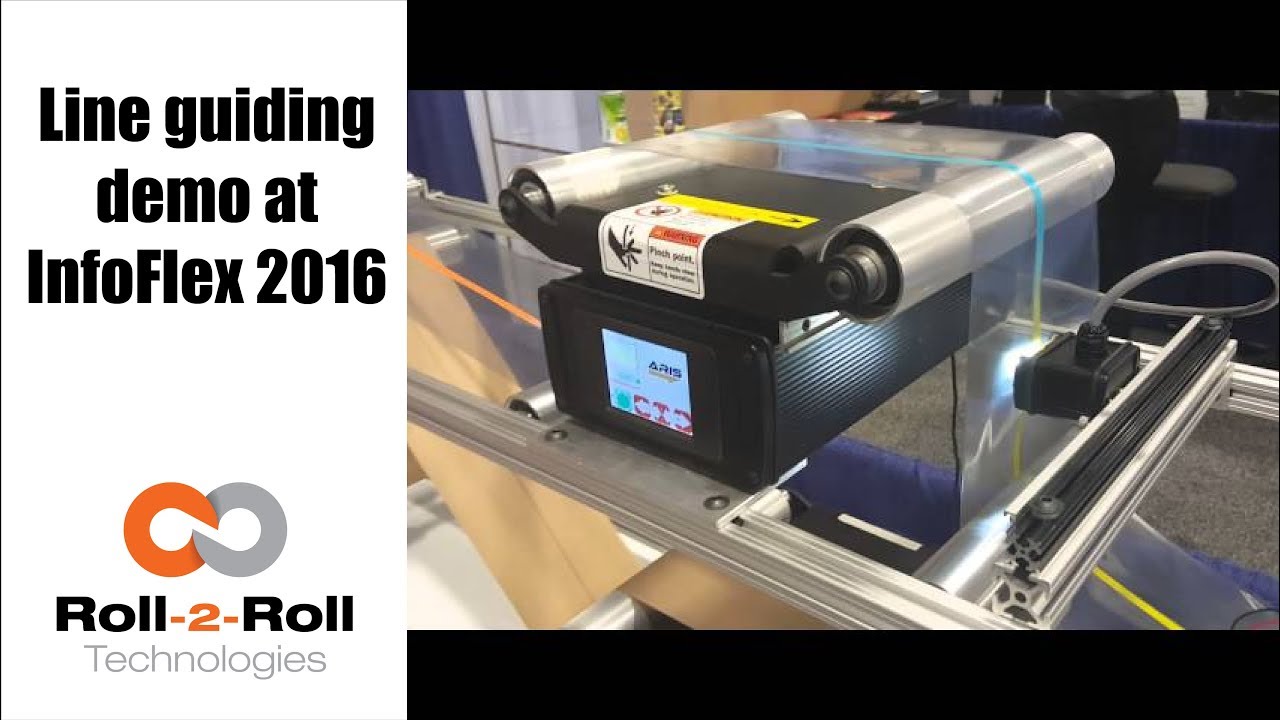
The line guiding capabilities of the compact web guiding system is enabled by the ARIS web position sensor as shown in this demo video.
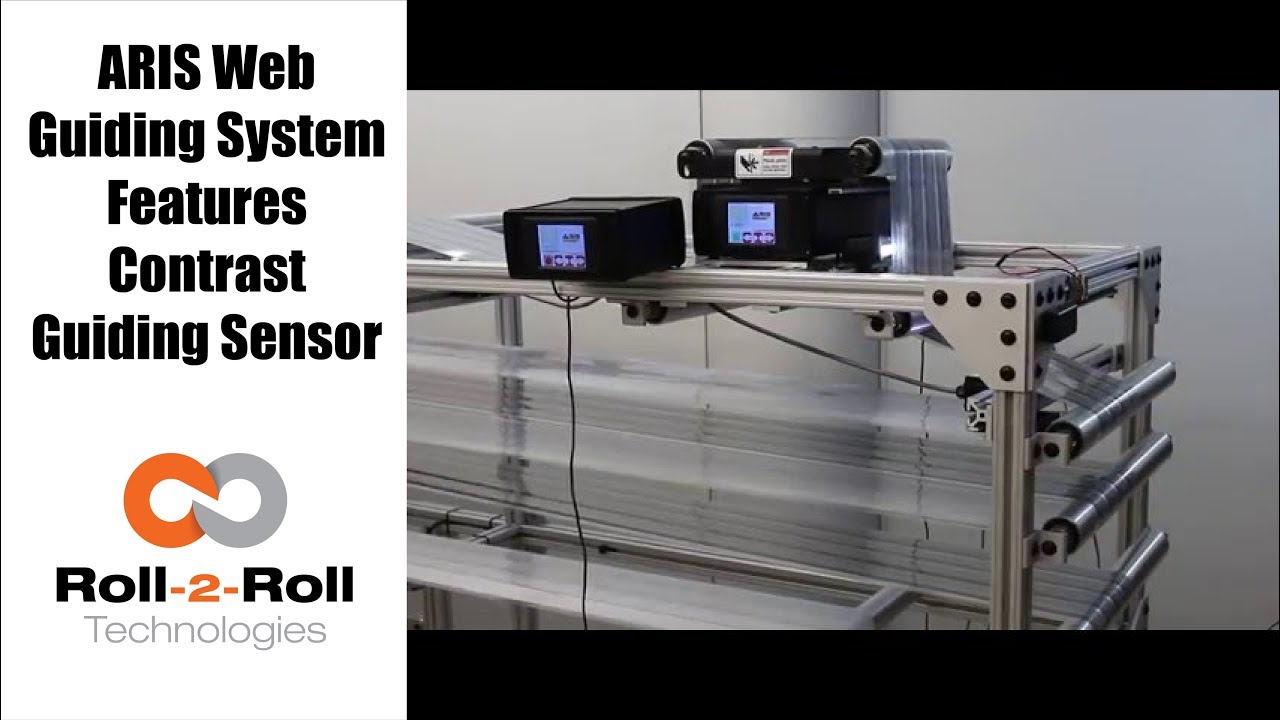
Roll-2-Roll Technologies compact web guiding system can be used for contrast guiding with the ARIS Web Position Sensor as shown in this video.
Transcript
Show full transcript (297 words)
our web guiding system ARIS features the latest in web guiding technology it adapts to any material, requires no calibration and is very simple to setup. Now it features a comprehensive guiding sensor that can be used in any kind of sensing including edge, line, contrast, composite or layered web detection. In this video we use two web guides as a test machine to introduce several speeds and disturbance frequencies. One web guide creates a disturbance while the other correct this disturbance.
This test allows us to evaluate how our machine adjust to these different disturbances. This video shows contrast guiding of composite web where the web is guided based on a die cut of the label. Our web guides can work with continuous or intermittent lines or contrasted edge. Our edge sensor detects the web position of any materials used without the need for manual adjustments.
A previous version of our sensor used a reflection of infrared light to take a picture of the edge of the material. These pictures and processed using digital signal processing algorithms to accurately sense the true position of the material irrespective of its physical properties. The updated version is more comprehensive and uses white light to take a picture of the web materials and in the line detection mode, the sensor can handle a solid or intermittent line or even in contrast between two materials. As you can see this video, the web guide is unaffected by missing labels.
Our tests have shown our sensor technology works automatically with materials of varying contrast. The use of fiber-optic technology eliminates a need for focusing and eliminates need for calibration and set-up. There are details on these experiments available in our white papers. You can find a link in our description below.

Check out the many capabilities our sensors have in edge, center, width, contrast and mark sensing. Our sensors require no calibration. These advanced sensor capabilities are shown here in this video.
Transcript
Show full transcript (756 words)
This Pedro Velasco with Roll-2-Roll Technologies And we want to show you a little bit more about our sensor technology and its different applications. So here we have a demo set up to show some of the features that are sensors have. Right now we're showcasing the 221 infrared sensor and on the left side you'll see the forty eight millimeter white light sensor which we used mostly for contrast sensing so we have already set up the Infrared sensor and we're going to do first let me show you the in the edge mode all the capabilities that it can do. So they can do so right now number one.
It can actually tell you exactly where the sensor is mounted and Which side is that it's that said its absolute sensing so as you can see it automatically detects a sensor And then it's affecting the edge on this side, right? but I Want [to] change it. Just press here if I come from this side? See it automatically detects no calibration needed for this operation.
Additionally we have other characteristics that we can do with this we can do something with this same sensor. We can measure width. We set it up to monitor in this case. It can be a pass or fail condition so now there's no material, so I'm gonna put a material here, and then I'm going to set a Condition and I'm going to set it up.
Let's say I want to accept two millimeters off That's accept so now it has recorded the distance that just width that I want right? but put another material, that's a different width It will leave me a fail condition because it's beyond the limits that I've all already set up over here So that's another characteristics of our sensors. We can also show you another which is the string mode right here for the 221 sensor if I present one string? will actually see one string.
But that is the same time you can also see two strings and you can see even Three and many more right, but the best thing that we can do is we can actually also give you the distance between the strings between the edge of the strings, so in this case is telling us between the third and First string there's Thirty six millimeters right however we can adjust this, prepare you with our system so that they can actually tell you the difference between individual strings Now let me hook up now our White light sensor so as you can see I'm just going to unhook our 221 sensor infarred sensor And then I'm going to just hook up The light light sensor as you can see it turns on immediately It detects it and of course a white light sensor can do edge guiding. All right Just this the other sensors You can do it from either side, it auto detects. But I can also select the mode So right now. It's going to do contrast sensing So it will tell me The position this contrast as you can see by that?
Green and Red bar right, but I can also tell you Not only that I can tell you the width of that So it gives us a 9-millimeter width, if I change it and see, it changes. of course, if I Had a steady hand this little better, [okay]? [okay], so that's one of us the many features that we have and that's with the white light sensor the contrast capabilities also, we [can] also give you a Mark so let's say for example. You have something like [this] We wanted to detect the mark, so as soon as the sensor sees it It will tell me that the mark is detective.
Mark detected. This comes across, so this has multiple applications if you had For example. We can actually give you the distance between marks through a one of our algorithms But the best thing we can do is, we can also do this with ultraviolet light and then you can have a mark with UV ink which can also be detected. So these are some of our capabilities that are sensors can do.
Of course now we're looking for other applications As we do our research in our developing products by right now these are available to you. Just give us a call or visit our website, and you can actually see your products there. Thank you very much